Data Storage Converter
Try Data Storage Converter
Loading calculator. If this message stays visible, enable JavaScript and reload.
Your result
Use the data storage converter to express a byte-based size in B, KB, MB, GB, KiB, MiB or GiB. The menus distinguish decimal units, which grow by 1,000, from binary units, which grow by 1,024. One GB converts to about 0.93132257 GiB, while one GiB converts to about 1.07374182 GB.
Start with a known size and identify the convention used by the source. If an application shows a familiar-looking unit with an unclear definition, look for a byte count or the documentation. A change of unit leaves the stored amount the same. The Data Storage Converter needs a number and two unit choices.
On this page
- Data Storage Converter supported decimal and binary sizes
- Data Storage Converter decimal and binary byte factors
- Data Storage Converter size inputs and unit conventions
- Data Storage Converter checked byte-conversion examples
- Why can drive labels, file sizes and free space disagree?
- How do bytes differ from bits and data transfer rates?
- When does a small result show zero or lose exactness?
- How can you export storage comparisons without losing context?
- Frequently asked questions
- Sources
How to use the Data Storage Converter
Data Storage Converter supported decimal and binary sizes
The data storage converter includes bytes, three decimal multiples and three binary multiples. The menu labels are B, KB, MB, GB, KiB, MiB and GiB. Each label can be selected on either side of the conversion.
Here B denotes bytes. The Data Storage Converter uses KB for 1,000 bytes, MB for one million bytes and GB for one billion bytes. Standard SI prefix notation uses a lowercase k for kilo, so documentation may write kB for the same decimal scale. Follow the meaning stated by the source and use the label printed in the form.
Binary labels include a small i. One KiB is 1,024 bytes, and each step from KiB to MiB to GiB multiplies by another 1,024. NIST’s reference on binary prefixes distinguishes these from decimal multiples. A file size expressed in MiB may therefore have a different numeric value when the target is the similarly named MB.
The menus stop at GB and GiB. TB, TiB and units based on bits are outside the list. If a source gives a TB amount under the decimal convention, first express it in GB. If it gives TiB, use the stated binary relationship to prepare an amount in GiB.
For an existing byte count, choose B as the source. That gives an unambiguous starting point even if a file manager would otherwise show only a rounded short label.
Data Storage Converter decimal and binary byte factors
The conversion uses bytes as its common scale. Multiply by the bytes in one source unit and divide by the bytes in one target unit. The byte count describes the same quantity through both operations.
| Menu choice | Bytes in one unit | Factor basis |
|---|---|---|
| B | 1 | Bytes |
| KB | 1,000 | One decimal prefix step |
| MB | 1,000,000 | Two decimal prefix steps |
| GB | 1,000,000,000 | Three decimal prefix steps |
| KiB | 1,024 | One binary prefix step |
| MiB | 1,048,576 | Two binary prefix steps |
| GiB | 1,073,741,824 | Three binary prefix steps |
For GB to GiB, first multiply the original number by one billion bytes per GB. Then divide by 1,073,741,824 bytes per GiB. The ratio is below one, so a positive GB value becomes a smaller numerical value in GiB.
One MB expressed in KiB is 1,000,000 divided by 1,024, which is 976.5625 KiB. The decimal prefix on one side and binary prefix on the other explain why a conversion across these scales rarely lands on the simple integers you get within a single family.
Use the basic calculator to check an expression against the exact byte factors. Keep the amount and unit side by side so it is clear which factor multiplies and which divides.
Data Storage Converter size inputs and unit conventions
Read the source amount and full unit. Type just the amount in the numeric field, select the original scale under From unit and choose the target from To unit. Select Calculate / Run and check the output unit. The factor line shows the selected target equivalent of one source unit.
For a requirement of 256 MiB expressed in decimal gigabytes, enter 256 with MiB as the source and GB as the target. The answer is approximately 0.26843546 GB. Entering the same amount under MB would start from 256 million bytes, which is a different size.

Use plain digits without grouping commas and a decimal point for fractions. If the source displays a larger number with a comma for every digit group, remove those separators before transcribing the amount. Choose B for an unambiguous whole byte count. For a rounded label, preserve the precision of the label when recording the answer.
Zero is a numeric amount that the Data Storage Converter can convert. A blank field still needs a value. The converter also scales signed values, which may be useful for a change such as a decrease in allocated space. For a standalone file size, use the actual nonnegative measurement.
Check both selectors again when using the Data Storage Converter for a list. The same target can stay selected while each source value and unit are entered in turn.
Data Storage Converter checked byte-conversion examples
Try these examples to check conversions within each family, between the families and from a byte count. All use the units exactly as the Data Storage Converter defines them. The calculations in the final column are independent of any particular disk or file system.
| Source | Target | Expected result | Arithmetic |
|---|---|---|---|
| 4,096 B | KiB | 4 KiB | 4,096 ÷ 1,024 |
| 1,500 MB | GB | 1.5 GB | 1,500 ÷ 1,000 |
| 1 GB | GiB | 0.93132257 GiB | 1,000,000,000 ÷ 1,073,741,824 |
| 1 GiB | GB | 1.07374182 GB | 1,073,741,824 ÷ 1,000,000,000 |
| 256 MiB | GB | 0.26843546 GB | 256 × 1,048,576 ÷ 1,000,000,000 |
| 1 MB | KiB | 976.5625 KiB | 1,000,000 ÷ 1,024 |
| 1,000 KB | MiB | 0.95367432 MiB | 1,000,000 ÷ 1,048,576 |
One billion bytes is both 1 GB and about 0.93132257 GiB. A change between those display labels can look like a loss in capacity. Compare the byte count to determine whether the source values really describe different amounts.
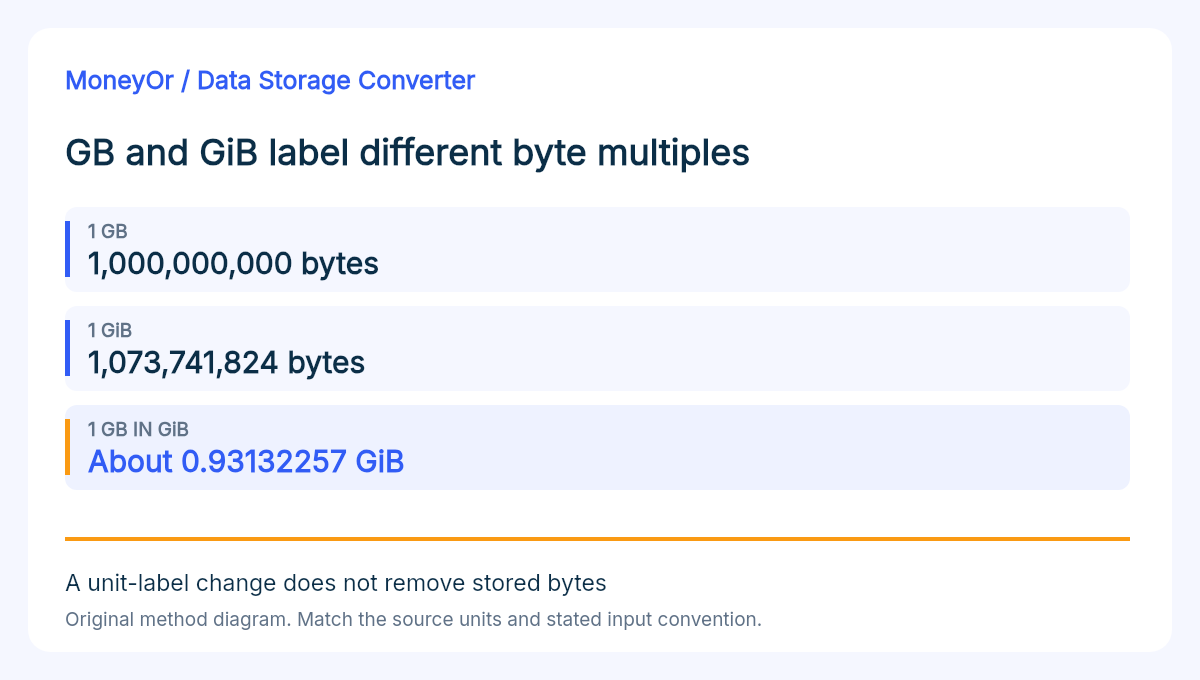
For a worksheet, GB to GiB and GiB to GB are different directions. Run both with a value of one to understand the factors. The smaller numerical result is expected in GiB because a gibibyte is larger than a decimal gigabyte.
Why can drive labels, file sizes and free space disagree?
First identify which quantity each display reports. A device can have an overall capacity, a partition capacity or a remaining free-space amount. The amount used by a file on disk can also depend on allocation details. Unit conversion cannot recover one quantity from a different quantity without the missing information.
For the same underlying byte count, a decimal and binary display can have different values. A 1,000,000,000 byte amount becomes 1 GB or about 0.93132257 GiB. If two sources use that same count, the unit factor accounts for their numerical difference. Additional information is needed to explain a difference between the underlying byte counts themselves.
Look for terms such as file size and size on disk. A logical file size describes its data length. A disk accounting figure can depend on blocks, sparse allocation or other file-system behavior. Enter the precise quantity you wish to convert so each result keeps its intended meaning.
If you are preparing a total for several folders, add the directly measured byte amounts where possible. Totals built from rounded GiB labels can differ from a total calculated from original counts. Keep the scope consistent across the list, especially if one column reports allocated space and another reports ordinary data length. Convert the resulting total once when the reporting sheet requires GB, MiB or another target.
For a separate file-focused conversion, the file size converter covers its own listed scales. Use the current data storage form when you need one of its seven particular choices. Both start from a value you already know.
A printed GB label can be ambiguous if software has used it historically for binary units. Where available, copy the raw byte count or verify the application’s unit definition first.
How do bytes differ from bits and data transfer rates?
A byte contains eight bits under the convention used here. For a static amount already stated in bits, divide by eight to obtain bytes before converting it in the Data Storage Converter. Read the letter case in the source. A lowercase b can denote bits, while uppercase B denotes bytes.
A notation like Mb/s is a rate. It commonly means megabits per second. A file size in MB is an amount. To estimate an amount from a rate, you need a duration and assumptions about how that rate applies across the interval. The conversion handles neither time nor network overhead.
For a simplified constant-rate illustration, 80 megabits per second corresponds to an ideal decimal 10 megabytes per second before allowing for whatever overhead or behavior affects the measured rate. Over ten seconds that ideal rate corresponds to 100 MB. Those separate operations come before entering a static size.
Use the time unit converter to put an existing duration into seconds when needed. If you are comparing device clock rates, the frequency unit converter changes hertz-based scales. A clock frequency alone does not supply bytes transferred per second.
Keep amount, elapsed time and measured rate in separate labelled fields. A similar-looking prefix can hide both a bit-to-byte difference and a time denominator.
When does a small result show zero or lose exactness?
The result format shows up to eight decimal places. One byte corresponds to 0.000000001 GB, which can display as 0 GB after rounding. Keep bytes or select a smaller target to represent a small nonzero value visibly. The printed zero describes the display precision on that scale.

A result in bytes can theoretically be fractional if the starting amount was a rounded or decimal quantity. Actual file lengths are normally counted in whole bytes. If you need a whole-byte threshold or allocation size, use the rounding rule for that task separately. The Data Storage Converter converts the numeric amount as entered.
Browser numbers have finite precision and are unsuitable for preserving every integer in a sufficiently large byte count. Also, reading a displayed decimal value back into the form can lose the digits rounded away by that initial display. Use the original byte count and exact unit factors in a suitable integer or high-precision workflow for exact large counts.
If a system rejects a file at its size limit, compare integer byte counts using that system’s exact limit and unit definition. A rounded display such as 1.5 GB may hide which side of the limit a file is on.
When a report uses a rounded capacity, keep the stated significant digits alongside a converted figure. A large set of displayed digits after conversion cannot improve the precision of the original measurement or device label.
How can you export storage comparisons without losing context?
For each item, record the original count, its unit and what it represents. A useful worksheet can have one column for source bytes and another for converted GiB. If the source gives only a rounded unit label, keep that label and the documented convention with the value.
Copy result includes the answer and factor. Download CSV creates a file with the result and the available details. Before using it in formulas, confirm how your spreadsheet has interpreted any grouping commas and where the unit text belongs.
Save as baseline retains one result during the page session. Use a common target scale to compare later results. As a check, a 1 GB baseline and a 0.93132257 GiB result can denote the same byte quantity at the display precision. Reset fields clears the result and saved comparison.
The conversion runs in the browser. It uses an amount and units and does not require uploading a file or copy of a device report. The site’s privacy policy describes broader handling of website data.
Use a raw byte count where you need a precise test against a limit. Settle the relevant unit definition before rounding the result for an audience.
Frequently asked questions
Is 1 GB larger than 1 GiB?
One GB is 1,000,000,000 bytes and one GiB is 1,073,741,824 bytes. The GiB is the larger unit. Compare the byte counts behind any particular values.
Is a kibibyte always 1,024 bytes?
Yes. KiB uses the binary prefix and equals 1,024 bytes. In the form, KB uses the decimal convention and equals 1,000 bytes.
Can I upload a file to get its size?
The tool takes a known size. Use your operating system or application to obtain that number, then type the amount and select the source unit.
Can I enter a terabyte directly?
The largest unit choices are GB and GiB. Under the stated convention, express decimal TB in GB or binary TiB in GiB before using the form.
Why does a whole number of bytes become a decimal?
The target unit can be much larger than a byte. The byte count can therefore represent a fraction of one target unit. The decimal describes the same quantity.
Can this calculate how much storage a folder uses after compression?
Compression depends on the data, format and settings. If you have a measured compressed size, enter it and choose the required scale. The conversion does not estimate the effect of compression.
Sources
- NIST: Definitions of the SI Units, The Binary Prefixes. Reference checked 26 November 2026.
- NIST: Metric (SI) Prefixes. Reference checked 26 November 2026.