Parallelogram Area Calculator
This parallelogram area calculator finds area from base and perpendicular height, then finds perimeter from base and the adjacent side. Enter all three lengths using the same unit. For a base of 10 metres, adjacent side of 6 metres and height of 5 metres, the area is 50 square metres and the perimeter is 32 metres.
Loading calculator. JavaScript is required.
Your result
The parallelogram area calculator uses the shortest distance between the parallel base lines as height. It is generally different from the sloping side. This version requires the side as well as height so it can report a perimeter and reject a height that exceeds the side length.
On this page
- How to use the parallelogram area calculator
- Area uses height; perimeter uses the side
- Three worked examples
- Checks for a measured shape
- Precision, supported lengths and saving results
- Parallelogram Area Calculator: Relating the side to its perpendicular component
- Questions about parallelogram area calculator
- Sources and method notes
How to use the parallelogram area calculator
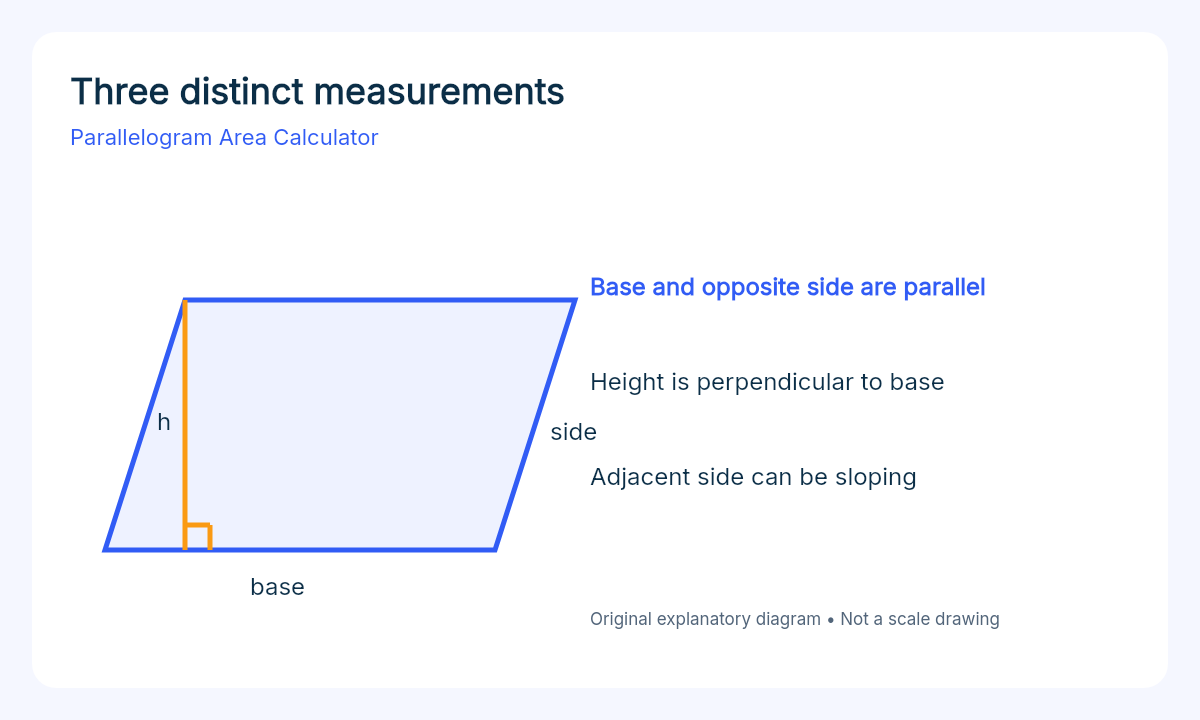
Choose one side as the base. Enter the length of a side next to it as the adjacent side. Measure the perpendicular separation between the base and its opposite parallel side, then enter that as height. A rotated drawing does not change these definitions. Height means a right-angle distance to the chosen base rather than whichever line happens to be drawn vertically on the page.
Convert all measurements to one unit before entering them. If base is in metres and side and height are in centimetres, first put the three lengths into a common system. The unit selector changes result labels only. Type decimal values without grouping separators, and use a decimal point. Number display can format the output separately for your preferred locale.
Area uses height; perimeter uses the side
Area = base × perpendicular height. Perimeter = 2 × (base + adjacent side). Opposite sides of a parallelogram are equal, so the boundary contains two copies of each entered side. Multiplying base by the sloping side instead of the height generally overstates area. That multiplication gives the correct area only when the adjacent side is perpendicular to the base.
Perpendicular height cannot exceed the adjacent side. The side and its vertical component form a right-triangle relationship, with height no longer than that side. Equality describes a rectangle, which is also a parallelogram. If base, side and height are all equal, the shape is a square. The parallelogram area calculator accepts these cases without requiring a separate tool.

Three worked examples
Example one uses base 10, adjacent side 6 and height 5 metres. Area = 10 × 5 = 50 square metres. Perimeter = 2 × (10 + 6) = 32 metres. Multiplying 10 by 6 would give 60 square metres, but that would incorrectly use the sloping side as height.
Example two uses base 5, side 3 and height 3 centimetres. Since height equals the adjacent side, this is the rectangle case. Area is 15 square centimetres, while perimeter is 16 centimetres. The general parallelogram formulas agree with the rectangle formulas because the geometric assumptions are compatible.
Example three uses base 2.5, side 2 and height 1.2 inches. Area = 2.5 × 1.2 = 3 square inches. Perimeter = 2 × (2.5 + 2) = 9 inches. The height is less than the side, so these measurements are compatible with a sloping parallelogram. They do not require the angles to be entered separately.

Checks for a measured shape
Both pairs of opposite sides must be parallel for this model to apply. An arbitrary four-sided shape does not become a parallelogram simply because you can measure a base, side and height. Check the outline or the problem's stated properties before treating the output as its area. A rough sketch alone may not establish parallelism or exact lengths.
If the problem changes which side is called the base, its corresponding height also changes. Keep each height paired with the side to which it is perpendicular. Swapping base and adjacent side while leaving height fixed generally describes a different area, even though the perimeter stays the same.
Doubling every dimension multiplies area by four and doubles perimeter. With base and side fixed, changing height alters area while perimeter stays the same, provided the new height remains valid. This explains why two parallelograms with equal side lengths can cover different areas. Equal perimeter alone does not determine the enclosed surface.
Precision, supported lengths and saving results
Each input must be between 0.000000001 and 1,000,000,000, and height must not exceed the adjacent side. Blank, zero, negative and non-finite entries are rejected. Results normally show up to eight decimal places. Very small and very large quantities use scientific notation. Browser numbers have finite precision, so rounded results should be interpreted in line with the accuracy of your measurements.
Changing a field clears the old result until the next calculation. Reset restores the sample dimensions. Copy uses the displayed values when your browser permits clipboard access. CSV downloads the represented numerical results with unit labels. The arithmetic runs in your browser without sending the dimensions to a calculation service.
For flooring, panels or other materials, geometric area is only one part of an estimate. Cutting direction, usable sizes, edge treatments and openings can change the quantity required. Perimeter also assumes a complete boundary without gaps. Keep those project details separate from this ideal shape calculation rather than treating either output as a complete purchasing or installation instruction.
Parallelogram Area Calculator: Relating the side to its perpendicular component
The parallelogram area calculator checks that height does not exceed the adjacent side. Geometrically, height is the perpendicular component of that side. Its ratio to the side is the sine of the included angle with the base. Different slant directions can share the same side lengths and height, so the inputs do not choose a unique left-leaning or right-leaning drawing.
For another example in the parallelogram area calculator, enter base 8, side 5 and height 3. Area is 24 square units and perimeter is 26 units. A 3, 4, 5 right triangle can describe the side's perpendicular and parallel components. Those components help interpret the geometry; they are not extra side lengths to add to the perimeter.
Questions about parallelogram area calculator
Can height be longer than the adjacent side?
No. Perpendicular height cannot exceed the adjacent side in a parallelogram. Check whether a measurement or label was mixed up.
Why do I need the side if area uses only base and height?
This version also reports perimeter and checks whether height is geometrically possible for the entered side.
Can a rectangle use this calculator?
Yes. Enter the rectangle width as both side and height, with its other side as base.
Do equal side lengths imply equal area?
No. Parallelograms with the same side lengths can have different heights and therefore different areas.
Does the unit selector convert the measurements?
No. Put all three measurements into a common unit first. The selector labels the current values.
Can the parallelogram area calculator take an angle instead of height?
No. Enter perpendicular height directly. If an included angle and adjacent side are known, height can be derived separately using the correct trigonometric relationship, but the angle's position and units must be clear. A degree value entered into the height field is interpreted as a length and answers a different problem.
Can the parallelogram area calculator be used for a rhombus?
Yes. A rhombus is a parallelogram with equal side lengths. Enter the same length as base and adjacent side, together with the correct perpendicular height. For example, base 5, side 5 and height 3 give area 15 square units and perimeter 20 units. Equal sides alone do not make the shape a square.
Does the parallelogram area calculator use diagonal measurements?
No. Its three inputs are base, adjacent side and perpendicular height. Diagonals can be useful in other geometric methods, but a diagonal does not replace either side field or the height in this version. Check the diagram's labels carefully, particularly when a diagonal is drawn close to a perpendicular construction line.
Can the area exceed base multiplied by adjacent side?
Not for valid inputs in this model. Height cannot exceed the adjacent side, so base multiplied by height cannot exceed base multiplied by side. Equality is the rectangle case. If the reported area seems larger than that upper bound, recheck the entered units and which dimension was labelled as the adjacent side.
What if rounded measurements make height slightly greater than side?
The calculator checks the entered numbers exactly rather than applying a measurement tolerance. Review the units, labels and precision of both measurements. Do not change a value solely to force a result. A height greater than the side is incompatible with an exact parallelogram under this input model, even if a rough sketch looks plausible.
Can a perimeter alone determine the area?
No. Perimeter fixes the sum of two adjacent side lengths, but it does not give a unique pair of sides or a perpendicular height. Different parallelograms can share a perimeter and enclose different areas. This calculator therefore requires the three stated dimensions rather than inferring an area from the boundary length alone.
Sources and method notes
Method and source notes checked on 26 November 2026. The diagrams are original explanatory drawings. Read the privacy policy for other site services.