Keyword Counter
Try Keyword Counter
Loading calculator. If this message stays visible, enable JavaScript and reload.
Your result
On this page
- Keyword Counter complete-token matches
- Keyword Counter passage and term preparation
- Keyword Counter checked word and phrase examples
- Keyword Counter separators and apostrophes
- What is an overlapping occurrence?
- When is a raw count more useful than a percentage or frequency list?
- How can I troubleshoot unexpectedly low or high counts?
- How should a review record the result?
- Frequently asked questions
- Sources
Worked example
Paste “Art, cart and art. Field guide, field-guide and field pocket guide.”: 12 words under the Keyword Counter’s punctuation and word rules. Searching “art” gives 2 matches: the complete words Art and art count, while the art inside cart does not. Searching “field guide” also gives 2 matches, because both the space and the hyphen divide adjacent tokens, and searching “guides” gives 0 matches, because the passage uses only the singular form guide.
How to use the Keyword Counter
Paste the passage into “Text to inspect”, type one complete word or phrase in “Keyword or phrase” (using its normal singular or plural spelling), and click “Calculate / Run”. Record the matches figure and the reported Words total, then repeat the run for each alternative term: the counter handles one term at a time, and case differences do not change the count.
Related tools
- Keyword Density Checker — express a keyword’s matches as a percentage of the passage.
- Word Frequency Analyzer — see a ranked list of the most frequent words.
- Word Counter — count the total words in a passage.
- Find and Replace — locate and replace exact text in a passage.
The keyword counter tells you how many times a chosen word or phrase appears in pasted text. Enter a passage in Text to inspect and a term in Keyword or phrase. The result gives the number of matching occurrences and the total words counted. The comparison ignores ordinary capitalisation and looks for a complete word or a consecutive sequence of words.
Use it when an editing question asks “how many times?” For example, count an interface label in a set of instructions, compare different spellings in a product guide or check repeated phrases before reviewing the actual sentences. Run one term at a time and keep the text selection consistent.
Keyword Counter guide and examples
Keyword Counter complete-token matches
The keyword counter compares the words it finds in your passage with the words in the term. For a single word, a match occurs when a whole counted word has the same value after lowercasing. A search for art counts the word art without counting the same letters inside cart or artist. The comparison gives a count of matching words instead of a list of their locations.
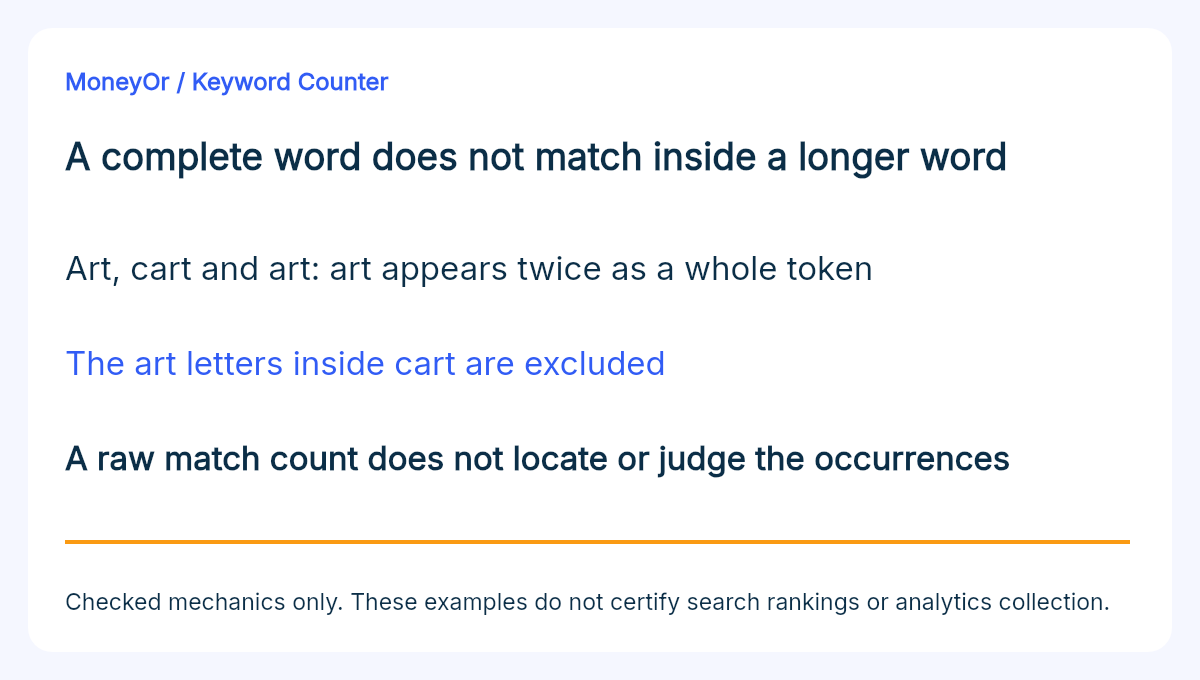
For a phrase in the Keyword Counter, each word needs to occur in the supplied order and next to the others in the token sequence. Searching for field guide counts that sequence in a short field guide. A word inserted between field and guide breaks that sequence. This distinction helps when a writer needs to count an approved label exactly while leaving related descriptions available to the reader.
Enter the passage itself. A pasted address or code snippet is interpreted as characters in the text box. The counter does not fetch pages or recognise which portion of a copied document was a caption, heading or menu. Check the text selection before comparing results from different sources.
Keyword Counter passage and term preparation
- Copy the section you want to inspect into Text to inspect. Keep a record of the selected scope, such as “instructions under the shipping heading.”
- Enter a complete word or phrase in Keyword or phrase. Use its normal spelling, including its singular or plural form.
- Choose Calculate / Run. Record the matches result and the reported Words figure.
- Repeat with a proposed alternative term or revised passage. Compare like with like by using the same source sections and writing convention.
Imagine reviewing a draft where training material calls the same control “Preview” in one place and “View” in another. Run a separate count for each spelling, then use the receiving application or a document search to find the actual occurrences. A count can help prioritise the review, but the word might also appear in a different context. Read each sentence before deciding whether to rename anything.
If you need locations, use the find and replace tool or your editor with the matching options that suit your inquiry. Mind the difference between literal text and token matches. A literal search with a space between words may skip a visual line break that this counter treats as a word boundary.
Keyword Counter checked word and phrase examples
Paste Art, cart and art. Field guide, field-guide and field pocket guide.. The Keyword Counter finds 12 words under its punctuation and word rules. Run the different terms below against the same input. This makes it easier to see the difference between total words, partial character sequences and phrase matches.
| Search term | Result | Reason |
|---|---|---|
art | 2 matches | The two complete forms Art and art count. |
cart | 1 | The longer word is a separate value. |
field guide | 2 matches | The space and hyphen each divide adjacent tokens. |
pocket guide | 1 | The pair appears together toward the end. |
guides | 0 matches | The passage uses the singular form. |
The interrupted phrase field pocket guide contributes one match for pocket guide and no match for field guide. That is useful when checking a specific label in context. If your question is about all references to the same subject, run related phrases separately and read the passage. An exact count does not combine alternative names into a single concept automatically.
Check the word total if a copied input seems shorter than expected. It may reveal that you selected only the first column or the visible part of a paragraph. You can also enter a smaller exact example as a comparison. If the example gives the count you expected, return to the full text and look for different characters or boundaries at the disputed positions.
Look at what the Keyword Counter result includes before transferring it to a spreadsheet. The count for a single match uses the same “matches” label as other counts. Extract the number and retain the reporting context beside it. A cell with the value one is useful only when you know which term and passage it describes. Avoid combining multiple runs into a single undifferentiated number when the team needs to review distinct words or compare two passage versions.
Keyword Counter separators and apostrophes
The Keyword Counter groups consecutive Unicode letters or numbers. A straight or curly apostrophe can stay inside a word when letters follow it. Hyphens, line breaks and most other punctuation act as separators. After tokenization, a phrase can match across those boundaries because the comparison only sees the remaining words in their original order.
For example, field-guide and field guide yield the same two tokens in the same order. A field label at the end of one line followed by a related label on the next line can also create a contiguous token sequence. When these lines represent separate records, count each one independently if you need the number of matches within records. A combined run may count a phrase that spans two of them.
A quoted phrase in an article does not require special syntax in the Keyword Counter. The tokenizer derives its words from both fields. If straight and curly apostrophes are meaningful in your document, test a short pair. The lowercase comparison preserves the apostrophe character when it belongs to the token. A curly form in the text and a straight form in the search may therefore compare differently even when the two look almost alike. Read the exact characters from their original source.
A quick example is Don't don’t.. Enter the straight-apostrophe don't as the term. The result is one match from two counted words. Enter the curly version to check the other position. If you are enforcing a typography rule, this isolated comparison helps distinguish two spellings that ordinary page browsing can make hard to see. If the purpose is to count every use of the contraction, record both variants under the same project-defined group after checking them.

What is an overlapping occurrence?
The Keyword Counter checks each possible starting position in the passage. If two matching occurrences share a word, both can count. For example, enter go go go and search go go. There are two matches. One starts at the first word, and the other starts at the second. The middle word belongs to both.

Overlap matters when you compare counts with a manual highlighting tool. Some editors jump to the end of the last highlighted match before searching again. Such a method can find only one of the two positions in this example. When you need testable counts for an editing report, spell out whether overlapping occurrences are included and verify that the other report uses the same convention.
Keep a short fixture on hand if the same phrase will be checked regularly. Include a question with one straightforward occurrence and a case that intentionally overlaps. This is useful for language work, repeated lyrics or transcripts where repeated words are part of the material. The fixture helps separate a difference in counting method from a difference in the passage itself.
When is a raw count more useful than a percentage or frequency list?
Use the raw count when you need to inspect a known term a specific number of times. An editor can count the occurrences before tracking down each one in a long draft. If you need to compare how much differently sized passages repeat the same term, the keyword density checker uses the number of matches, phrase length and passage word total to give a percentage. Keep its counting conventions in view when reading that figure.
Use the word frequency analyzer when you want to discover which individual words appear most often. It shows a ranked list instead of asking you to name the word first. If an unexpected word appears in the frequency output, return to this counter to see how often a longer expression containing that word occurs. The tools answer different questions about the same passage.
The word counter addresses a total-length question. When you need an exact match report here, use the Words figure printed beside the count because it comes from the same tokenizer. Totals from another editor can differ on hyphenated terms, apostrophes and scripts without conventional spaces.
How can I troubleshoot unexpectedly low or high counts?
Reduce the source to a short example that includes the disputed occurrence and a few nearby words. Check its spelling and capitalisation, then look for punctuation and variations that the tokenizer may interpret differently. If your source uses several word forms, test them one by one. A result for guides will not account for guide unless both exact forms appear as separately counted searches.
Check whether a copy introduced unmatched Unicode spellings. A text field can display a letter plus a combined accent with a shape similar to a single accented code point. The Keyword Counter lowercases and tokenizes without applying Unicode normalization. A general word-boundary standard describes additional complexities in how software can define a word. The implementation here uses its own simple letter, number and apostrophe expression. See the Unicode text segmentation specification.
For unexpected matches, reread the original separators. A heading and the first word of its paragraph may become adjacent after punctuation is dropped. An item ending with “field” and the next item beginning with “guide” can also create an extra occurrence. To preserve boundaries, isolate sections or fields before counting and add the separate results when that is the measurement you want.
How should a review record the result?
Include the checked text scope, exact phrase, match total and word count. If the paragraph belongs to a versioned file, record the version or date so another reviewer can find the same selection. Save a short, non-confidential sample showing the rule when you need to explain why a count differs across tools.
A Keyword Counter report can use separate rows for spelling variants. For example, keep singular and plural results separate first, then decide whether you want to include both in a wider summary. Adding the numbers assumes the match sets describe the same intended scope. If the searches overlap, a total can count the same text position more than once. Use a document review for any result that needs unique positions.
For a long pasted draft, verify that the opening and closing words match the section you intended to include. The text splitter can help prepare separate selections when the source has consistent delimiters. If you are counting across editable records, preserve the original document so that the output can be rechecked without recreating the source by hand.
For an approval note, include a sentence explaining what the count helped you verify. For example, “The accepted label occurs twice in the body instructions, once in the setup step and once in the example.” That sentence preserves a human check in addition to the numerical one. If several people review a draft, agree on whether the title and setup captions are included before exchanging results. A reviewer using a different scope can otherwise reproduce the matching rule correctly and still give a different count.
Keep a version date when the page will be revised repeatedly. It gives the next editor a clear starting point and lets them distinguish a wording change from a different selection or matching rule.
Frequently asked questions
Does spelling in uppercase change the number?
Ordinary case differences do not change the number. Both the passage and the search phrase are lowercased before the Keyword Counter compares their words.
Can I count several different terms in one run?
The term box represents one sequence. To count separate terms, run them one at a time and record each total. Entering a list of terms in the box searches the resulting consecutive word sequence.
What happens if I enter only punctuation as the keyword?
The phrase needs at least one supported word or number token. A punctuation-only value gives an error. Use another text tool when the task is counting specific symbols.
Does the result show where the word occurs?
The result shows the count and words examined. Use an editor search or a context tool to identify individual positions or review the surrounding sentences.
What happens when the passage is only symbols?
The counter shows zero matches and zero words when the passage produces no word tokens. Enter a valid keyword and test a passage containing countable words to check the workflow.
Can I use the match count for a search performance claim?
The number describes the supplied text under a particular rule. Use it to reproduce an editorial check. Search performance requires separate measurements and context.
Sources
The Keyword Counter fixtures verify complete tokens, apostrophe spellings and overlapping phrase starts in the actual engine. Unicode Text Segmentation explains broader boundary concepts; this tool uses its own simpler pattern. MDN Unicode character classes describes its letter and number properties. References checked 26 November 2026.