Word Frequency Analyzer
Try Word Frequency Analyzer
Loading calculator. If this message stays visible, enable JavaScript and reload.
Your result
On this page
- Word Frequency Analyzer ranked-word output
- Word Frequency Analyzer selection and comparison
- Word Frequency Analyzer checked count examples
- Word Frequency Analyzer token definition
- Why can a word be absent from the displayed list?
- How can I use the results in an editorial review?
- What can distort comparisons across sources?
- How can I find where a frequent word appears?
- Frequently asked questions
- Sources
Worked example
Enter “Tea tea and toast. Toast with jam.” and click “Calculate / Run”. The passage has 7 counted words and 5 unique words. The list reads tea 2, toast 2, and 1, jam 1, and with 1: Tea and tea merge into one lowercased value, and toast appears once in each sentence. A tie uses locale-aware text ordering, rather than first appearance. The discriminating sample “zoo ant zoo ant” returns ant before zoo when both occur twice in the checked runtime.
How to use the Word Frequency Analyzer
Paste the exact passage into “Text to analyze” and click “Calculate / Run”. Read the ranked rows together with the Unique words total, and compare passages by scope, not by raw counts alone: a longer text will naturally produce higher frequencies, and only the first 15 distinct words are displayed even when the unique total is larger.
Related tools
- Keyword Counter — count one chosen term in a passage.
- Keyword Density Checker — express a term’s coverage as a percentage.
- Word Counter — count the total words in a passage.
- Text Splitter — prepare separate passages for comparison.
The word frequency analyzer ranks the individual words in pasted text by how often they occur. It displays up to 15 word counts and reports how many distinct words it found across the whole input. Common words such as “and” can appear because the tool does not apply a stop-word list.
Use the results to spot terms you may want to reread in context. A frequent word can name the subject, link ideas or reveal accidental repetition. The count describes the sample you supplied. Its meaning depends on which excerpt you chose, how the words were separated and what kind of writing you are checking.
Word Frequency Analyzer guide and examples
Word Frequency Analyzer ranked-word output
The word frequency analyzer turns words into lowercase, counts each distinct value and sorts the results from most frequent to least frequent. When counts tie, it compares the words using the runtime's normal locale-aware text ordering. The result contains one row per displayed word, with a colon separating the spelling and the count. The Unique words total can be larger than the number of displayed rows.
In the Word Frequency Analyzer, a distinct word is a token with its own spelling after lowercasing. Five appearances of the same token add five to that word's frequency while contributing one to the distinct-word total. Two forms of a verb can be separate tokens. A compound split at a hyphen can contribute counts for each part, which can make the distribution look different from a report that considers the compound one word.
The Word Frequency Analyzer serves a discovery question. Start here when you want to know which words stand out without deciding a target in advance. Once a row catches your attention, find the occurrences and read the lines around them. A list of frequencies cannot tell whether every use belongs to the same subject or part of speech.
Word Frequency Analyzer selection and comparison
- Decide which text the comparison covers. Choose equivalent sections of two drafts, such as the body of one guide before and after an edit.
- Paste the first selection in the text area and select Calculate / Run. Record any rows you want to review and the distinct-word total.
- Run the second selection using the same scope. Keep the original excerpts so you can trace any surprising change.
- Read the revised sentences containing the terms you flagged. Consider their purpose and the length of each selection before comparing raw frequency counts.
Copy only what the review needs. Including a navigation panel or a list of reference links can introduce repeated words from outside the passages you mean to compare. If a heading or caption is part of the review, mark it in your scope and include the same kinds of content on both runs. A count from a full article and a count from only its introduction answer different questions.
Use the same format where possible. A web preview, a spreadsheet cell and a Markdown source file can carry different text when copied. The word frequency analyzer sees what reaches the input field. Verify the first and last lines, especially if an editor folded part of a long section or copied hidden labels alongside the visible selection.
Word Frequency Analyzer checked count examples
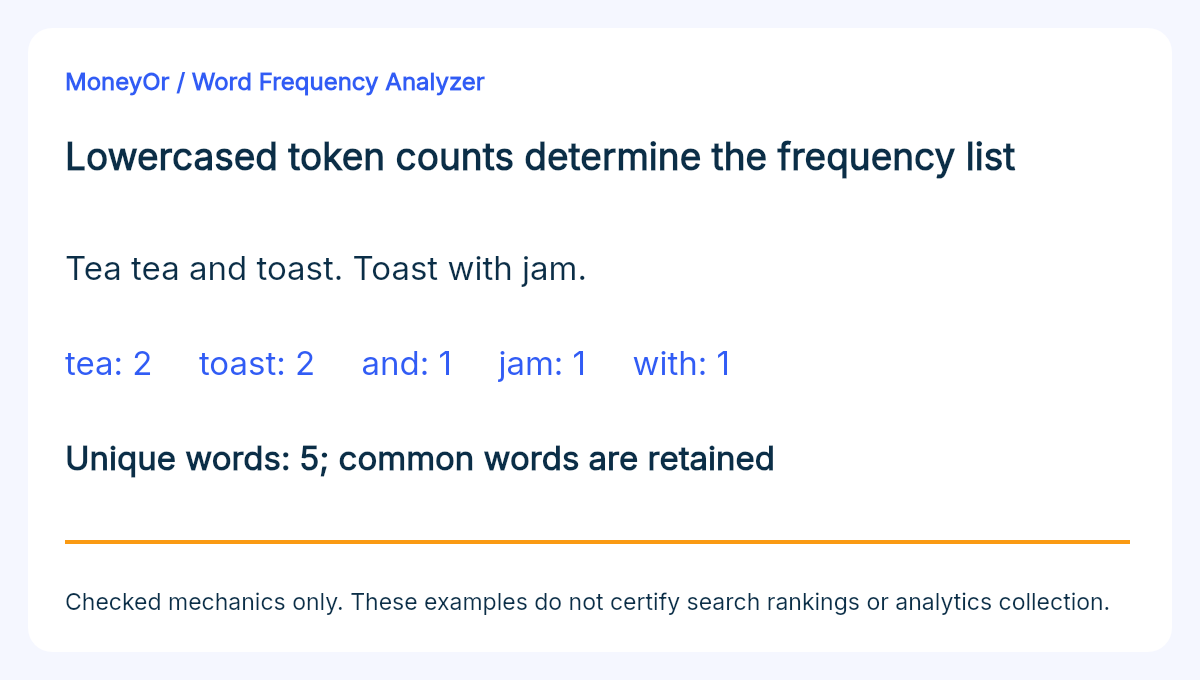
Enter Tea tea and toast. Toast with jam.. The passage has seven counted words and five distinct lowercased words. The analyzer reports Unique words: 5. It shows the following rows in the checked locale.
| Returned word | Count | Source of the result |
|---|---|---|
| tea | 2 | The title-case and lowercase spellings become one value. |
| toast | 2 | It appears on both sides of the sentence break. |
| and | 1 | The conjunction stays in the frequency list. |
| jam | 1 | It appears once at the end. |
| with | 1 | This single occurrence sorts after the other one-count words. |
Two pairs of numbers in the Word Frequency Analyzer example answer separate questions. Tea and toast each have a frequency of two. There are two distinct words with that frequency. If you add all five displayed counts in the example, you get the seven tokens in the short passage. The addition only reconstructs the total when every distinct word made it into the displayed rows. For longer inputs, the 15-row cutoff can hide some of the positive counts.
To check the ordering independently, mark the word positions in a copy of the sample. Combine the differently capitalised forms of tea and toast, then count their total appearances. The count is less confusing when you record the tokens in their original order first and sort the summary afterward. This method also shows how a period separates one word from the next without adding a word of its own.
A second sample such as Blue green. Green blue. Red. makes the tie rule easy to see. Both blue and green occur twice. The checked comparison displays blue before green, then red with one occurrence. Reordering the source sentences without changing the individual words leaves the frequencies unchanged. That property is useful when you want a vocabulary comparison and can read the text in its own order separately. It also means the list cannot tell you which colour appeared first.

Word Frequency Analyzer token definition
The tokenizer looks for runs of Unicode letters or digits. It also allows a straight or curly apostrophe followed by letters inside a token. An ordinary contraction can stay together. Punctuation such as hyphens, commas and full stops generally separates the word runs. For example, Sun-dried sun dried. reports two for dried and two for sun in the checked locale.
A numeral can appear in the result because runs of digits count as word-like values. This can be useful in a short set of product references, but it also means a page that lists dates, item codes or figure numbers can show those fragments among its frequent words. Decide whether you want them in the sample before analysing a catalogue excerpt. Remove them in a clearly marked working copy only when the scope of the review calls for it.
Languages differ in how they mark word boundaries. A whitespace-separated writing sample may be straightforward under this rule. A script that uses different segmentation conventions may yield long letter runs or words split at combining marks. The Unicode Text Segmentation specification explains language and script considerations for boundary detection. The Word Frequency Analyzer uses a simpler expression and does not claim to implement the standard's full segmentation rules.
Why can a word be absent from the displayed list?
The engine ranks all distinct words internally and shows the first 15. A correctly spelled term can be present in the input but fall below the cutoff. When many words have the same count around that boundary, the tie order determines which of them appears in the display. Check the Unique words figure to see whether the list can cover all of the word values in the input.
For example, consider a passage with the 16 different labels ant bear cat dog eel fox goat hare ibex jackal kiwi lion mole newt owl pup. Each label occurs once. In the checked locale, the displayed list begins with ant and finishes with owl, while pup is outside the displayed 15. The total still reads Unique words: 16. The missing row is a display limit rather than evidence of an absent word.

The keyword counter can verify any chosen term outside the displayed list. Check a single word to confirm its count or enter a multiword phrase if the adjoining context matters. Keep the same source selection for both tools so the individual result can be compared with the ranked list.
How can I use the results in an editorial review?
Ask what the frequent word is doing. A procedural article can repeat a button name to help readers find it at several stages. A report can repeat a product name to distinguish it from another item. The same word can also be repeated accidentally in a short paragraph where a pronoun or a clearer sentence structure would work. Read the particular uses before editing them.
A rank change can help direct attention. If a common word fell out of the list after a revision, it may have been replaced, or other words may simply have become more frequent. Use the raw counts and your excerpt lengths to compare the change. The keyword density checker can give a relative measure for a known term. Its percentage comes from one selected sequence and a word denominator, so keep that definition separate from this ranking.
When using the Word Frequency Analyzer on a small research or feedback sample, remove personal identifiers before pasting. Record the scope and any decisions about boilerplate, identifiers and labels in a separate note. A frequency result can guide questions about a text collection, but it cannot establish sentiment or intent, and it should not replace reading the source responses.
Suppose a class collects short feedback about a library display. A frequent word such as “space” can refer to room to sit, blank space on a sign or the subject of an astronomy display. Before giving the count a meaning, read the relevant responses and create categories that reflect the actual question. A manual category can group different words that express the same idea. The displayed frequency remains useful for identifying which exact spellings to locate, even when a later meaning-based coding step uses a different method.
What can distort comparisons across sources?
Word Frequency Analyzer counts from different source lengths are hard to compare directly. Longer writing tends to create more opportunities for a word to appear. A list with ten short captions does not have the same distribution as a continuous paragraph of the same length, particularly if the captions repeat a product identifier. Describe both the content type and selection before treating one count as unusual.
Different editing styles can change what the Word Frequency Analyzer sees. A team that spells dates in words and a team that writes them as digits may generate different word lists without changing their message. A translation can add several words to express the same idea. Keep comparisons within the relevant language and format when you are checking how a draft changed.
The word counter can display general text-length information when you need a separate size check. The ranked list here does not display a total token count alongside its unique count. Use a consistent counting method when reporting another measure, and mention that word boundaries may differ between tools.
For weekly Word Frequency Analyzer reviews, decide how to handle recurring headings and template text. A duplicated introduction can keep the same frequent words in every report even when the new body concerns a different subject. Measure the new body on its own if your question concerns only new content. Save the decision alongside the comparison rather than silently removing common lines. Someone comparing the full published pages may get a different result for a good reason. They are measuring the complete reader-facing document while your report measures one editorial portion of it.
How can I find where a frequent word appears?
Copy a small piece of the original into an editor with a search function. Search for the term and inspect its matches one by one, including the location of a heading, example label or citation. Look for plural or inflected forms if the editorial question is about a concept. Individual exact-word counts will separate those spellings.
For a typed word with a simple character pattern, the find and replace tool can help test a literal search on an expendable copy. A literal operation can find the same sequence inside a longer word, so check its matching behavior before relying on it for exact-token positions. Keep the original intact while reviewing alternatives.
If a longer passage has sections with noticeably different styles, use the text splitter to prepare separate selections when they share a reliable boundary marker. Then run the frequency analysis section by section. This can reveal a frequent word that appeared only in a specific set of instructions and was too infrequent to reach the full-document ranking.
Frequently asked questions
Does the list include repeated phrases?
It shows individual words. Use a phrase counter for a chosen sequence such as field guide. A list with separate counts for field and guide cannot establish how often they were adjacent.
Does the analyzer ignore common words?
It includes common words when they fit the tokenizer. Prepare a working copy with a documented exclusion list if your review needs to remove stop words consistently.
Will similar word forms be combined?
Ordinary capitalisation is combined by lowercasing. Other differences in spelling can produce separate entries. For example, a singular noun and its plural are counted separately.
Why does every count appear to be one?
The words in the input may all have different values after lowercasing. Look at the source and the distinct-word total. A large set of ties is displayed using the locale-aware order and row limit.
Can I tell the original letter case from the results?
The rows use lowercased words. Store the original text if you need to preserve proper styles or verify case differences by position.
What if I paste only punctuation?
The Word Frequency Analyzer reports No words found and zero unique words when no qualifying word runs exist. Check that the intended passage reached the text field before comparing it with another sample.
Sources
The Word Frequency Analyzer tests verify lowercasing, fixed token counts, locale-aware ties and the fifteen-row display limit. MDN String.localeCompare() documents text ordering. MDN Unicode character classes describes the matched properties. References checked 26 November 2026; the result does not infer meaning or sentiment.