Text cleaner
Try Text Cleaner
Loading calculator. If this message stays visible, enable JavaScript and reload.
Your result
The text cleaner applies a fixed whitespace cleanup to plain text: trim both edges of each line, replace internal whitespace runs with a single space and remove empty rows. Nonempty rows stay in their original order. MoneyOr does not rewrite sentences, remove HTML tags, standardize punctuation or identify the author of a passage.
Use it for ordinary lists and notes whose spacing has become untidy during copying. Keep the original when indentation, blank rows or column spacing matters. The result is a normalized text candidate, not a validated document. A useful cleanup preserves the intended words and structure, so review the transformation before replacing a source or transferring it into another application.
On this page
- Text Cleaner trim, collapse and filter pipeline
- Text Cleaner copied-list preparation
- Text Cleaner checked whitespace examples
- Text Cleaner complete cleanup walkthrough
- Which content is unsuitable for this cleanup?
- Does cleaning remove HTML, punctuation or hidden Unicode?
- How do I verify that the result remains useful?
- What limits and references explain the operation?
- More text cleaning questions
- Sources and final inspection
Text Cleaner guide and examples
Text Cleaner trim, collapse and filter pipeline
The text cleaner performs three related operations on the same input. First it splits the source into rows at carriage returns or line feeds. It trims whitespace from the beginning and end of each row. It then collapses whitespace runs within each row to one ordinary space, drops rows that are now empty and joins the survivors with line feeds.
This means a row containing several spaces between words becomes a row with single spaces. Tabs inside a row also become spaces. A row containing nothing but trimmable whitespace disappears. Letters, punctuation and duplicate entries remain, except for the spacing changes around them. The Text Cleaner does not decide which words or symbols are appropriate.
The pipeline is fixed rather than a menu of independent cleaning options. If you only need one of its steps, choose the narrower tool. The Text Trimmer keeps internal gaps, and the Blank Line Remover preserves the original text of surviving rows.
Text Cleaner copied-list preparation
Start with a copy of the original list. Check whether repeated spaces, tabs and blank rows are accidental. If they are acting as column boundaries or indentation, do not flatten them without a plan. A readable label list is a better candidate than a table whose columns are aligned with spaces.
- Paste a representative excerpt into Your text.
- Include the kinds of gaps present in the full source.
- Run the cleanup and compare each row with the original.
- Check words that were separated by tabs or unusual spaces.
- Confirm that deleting blank rows does not change record relationships.
- Clean the full list and review it again in the destination.
For a pasted set of labels, the goal may be a compact row for each label with one space between words. The fixed pipeline suits that intention. For a mailing address or a poem, a blank row may be meaningful. Select only the portion whose layout is disposable rather than cleaning everything because it fits in the input field.
Do not combine cleanup with corrections to uncertain wording in one unrecorded step. Keep a normalized candidate, compare it with the source and then make editorial changes separately. This makes it easier to notice if the spacing operation removed a distinction you actually needed.
Text Cleaner checked whitespace examples
The examples below were checked in code against the current operation. In this table, words describing a tab, newline or nonbreaking space stand for those actual characters in the test. They are written visibly here so the explanation does not rely on hidden typography.
| Input | Checked output | Meaning of the change |
|---|---|---|
| Two spaces, red, tab and space, blue, two spaces; blank row; green with three spaces before gold | red blue green gold | Trim, collapse and blank-row removal combine. |
| A, two nonbreaking spaces, B | A B | Recognized internal whitespace becomes one ordinary space. |
| x on one line; space then x on the next | x x | Duplicates remain after trimming. |
| <b> Hi </b> | <b> Hi </b> | HTML-like text is not stripped. |
| a, zero-width space, b | Unchanged | Not every invisible character is whitespace. |
| a, Unicode line separator, b within a row | a b | The internal whitespace collapse handles that character. |
The last example illustrates two different rules. The row splitter only recognizes CRLF, CR and LF. A Unicode line separator can therefore remain inside a row until the whitespace-collapse step turns it into a space. This is specific pipeline behavior, not a general promise that all line-like characters become new rows.
For a different problem, such as repeated normal spaces within prose while preserving meaningful lines, inspect the Extra Space Remover and its exact rule. Similar names do not imply identical treatment of tabs, line endings or outer whitespace.
Text Cleaner complete cleanup walkthrough
Take a first row with outer spaces and the words red and blue separated by a tab plus a space. Follow it with an empty row, then a row containing green and gold separated by several ordinary spaces. The Text Cleaner identifies the three rows. Trimming removes the first row's outer spaces and any outer whitespace on the other rows.
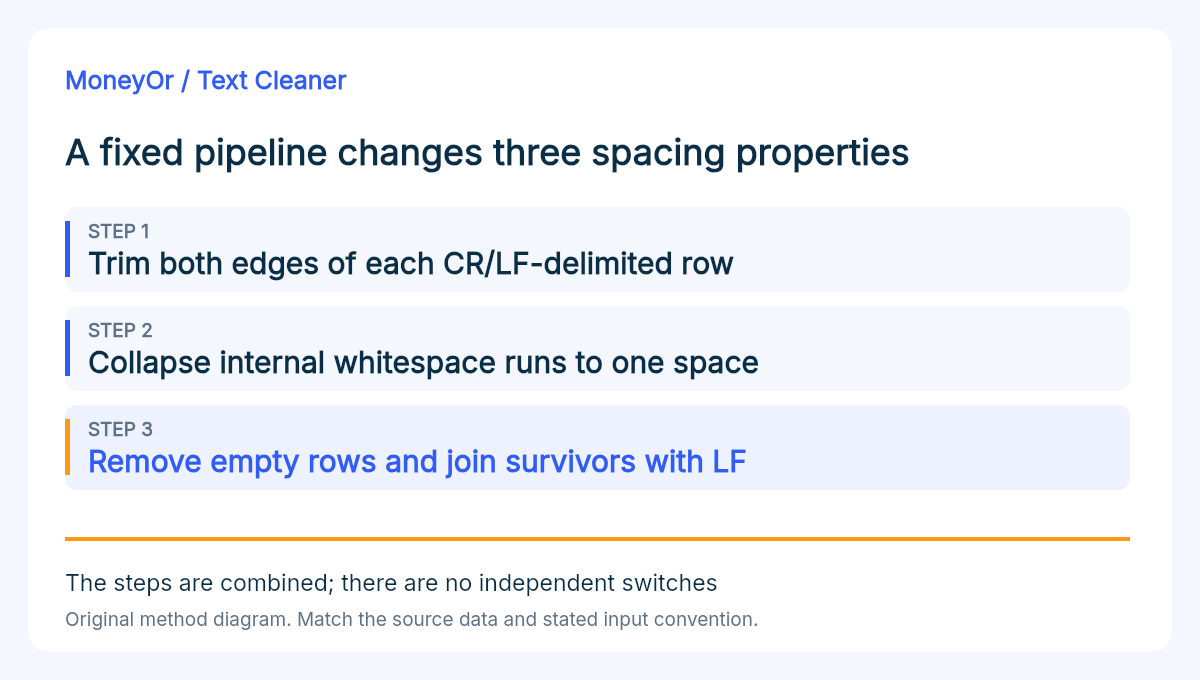
The internal whitespace run between red and blue becomes one space. The internal gap between green and gold also becomes one space. The empty middle row is discarded. The final text contains red blue on the first row and green gold on the second row.

Nothing in this process recognizes colors, corrects spelling or verifies whether those labels belong together. If the first row were repeated, both copies would remain. If it contained a comma or an HTML-like tag, those characters would remain. The transformation is based on spacing rather than meaning.
Keeping the stages in mind helps explain an unexpected result. If indentation disappears, trimming caused it. If a tab becomes a space, internal collapse caused it. If an empty row disappears, filtering caused it. Choose a narrower tool when only one stage is acceptable, rather than trying to reverse several discarded distinctions afterward.
Which content is unsuitable for this cleanup?
Avoid applying it indiscriminately to code, fixed-width records, aligned tables, poetry or text with meaningful indentation. Multiple spaces can define columns. Tabs can separate spreadsheet fields. Blank rows can distinguish sections. Converting them into simpler spacing may make the output look tidy while damaging its structure.
Quoted strings deserve particular attention in code or configuration. A space inside a string can be part of a value, even when it looks like formatting. The Text Cleaner does not parse the language and cannot distinguish string content from syntax. Use a formatter designed for the actual language or format.
The JSON Formatter and JSON Minifier serve JSON-specific tasks. A generic whitespace pipeline is not a replacement for parsing JSON. It cannot know which whitespace is insignificant and which belongs inside a string.
For extracted prose, the Text Cleaner also does not repair words broken across printed lines. It keeps nonblank rows separate, so a hyphenated wrap remains split. If your intention is to reflow a paragraph, first establish which boundaries are merely wraps, then use the operation suited to that goal.
Documents with mixed purposes are best handled in sections. Clean a plain-text label list separately from an embedded code sample or quotation. This preserves control over changes and reduces the chance that a broad formatting operation alters content whose layout carries information.
Does cleaning remove HTML, punctuation or hidden Unicode?
No general removal of those categories occurs. HTML-like tags remain as text. Smart quotes and dashes remain. Letter accents remain. The rule handles whitespace according to JavaScript trimming and whitespace matching; it is not an HTML sanitizer, typography normalizer or comprehensive Unicode cleanup.
A checked zero-width-space example remains unchanged. Some invisible characters have legitimate roles in text, and appearance alone does not establish that they should be removed. Identify the specific character and the destination's requirement before using a different editing method.
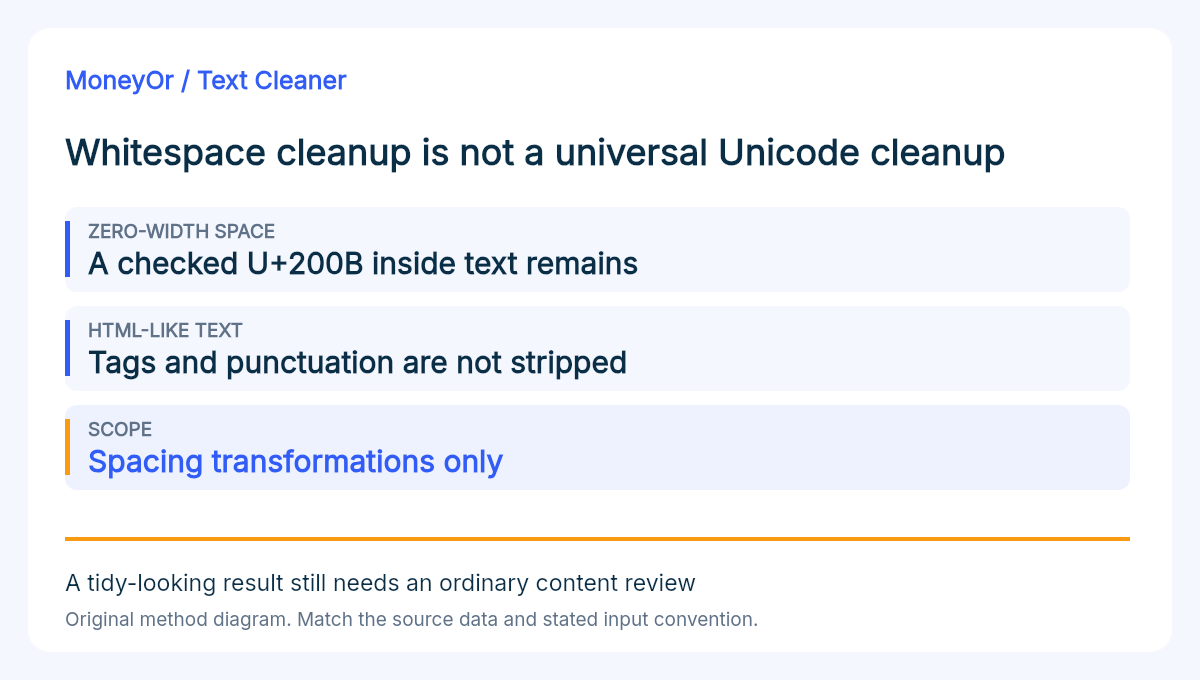
Cleaning spacing also does not establish who wrote the passage or whether it was assisted by software. The Text Cleaner offers formatting changes, not authorship assessment. Review writing for accuracy, clarity and appropriate attribution independently of how its spaces or punctuation look.
If a pasted string contains literal HTML entities such as an ampersand followed by a named entity, the Text Cleaner does not decode them into characters. Likewise, it does not interpret a backslash-n sequence as a newline. The input is handled as text, except for the documented whitespace transformations.
When preparing content for a publishing system, use that system's normal plain-text paste and formatting controls as appropriate. Check the rendered result after pasting. A cleanup tool can change stored characters, while paragraph margins, fonts and other visual formatting belong to the destination.
How do I verify that the result remains useful?
Compare the surviving words and punctuation with the original in order. Inspect every place where a tab or repeated space used to separate fields. Then check which blank rows disappeared. A successful transformation only proves that the rule ran; it does not prove that the rule was suitable for the source.
The Word Counter can help with a rough completeness comparison, but counters use their own definitions. Removing whitespace can alter token boundaries in unusual input. Read the text rather than relying only on equal counts or a shorter character total.
Review the first and last rows after transferring the result. Long input fields and destination editors may only display a portion of the content at once. Check that the complete result was copied and that the destination has not introduced formatting you did not intend.
If cleanup changes a list's meaning, return to the original and choose a narrower operation. A compact result no longer contains the exact positions or widths of discarded gaps. Attempting to reconstruct them from memory is less reliable than restarting with the saved source.
For recurring work, document the intended cleanup rule in your workflow. If the input is consistently a plain label list, the same fixed pipeline may be useful. If its structure changes to a table or code sample, reassess the Text Cleaner instead of assuming an earlier choice remains appropriate.
A useful acceptance check is to state the intended representation before processing: one nonempty label per row, one ordinary space between words and no outer spacing. Then compare the result with that statement. If the input includes subitems, columns or deliberate blank sections, revise the plan rather than forcing those distinctions into the simpler representation.
When two entries become visually identical after cleanup, both still exist. That can reveal inconsistent spacing in the source, but it does not establish that either occurrence should be deleted. Review their context or associated identifiers before deciding whether they represent the same record. Appearance and identity are separate questions.
What limits and references explain the operation?
The engine accepts up to 500,000 JavaScript string units. An ASCII sample exactly at that boundary was accepted in a code check, while a sample one unit larger was rejected. UTF-16 units are not always the same as visible characters; some symbols occupy more than one unit.
The transformation runs in the browser tool engine. Website delivery and analytics are separate from the text operation. Read the MoneyOr privacy policy for the broader site practices and use appropriate sample material when experimenting with unfamiliar behavior.
MDN Web Docs' String.prototype.trim() explains edge whitespace removal. Its Character class escape reference explains whitespace matching, and String.prototype.split() explains dividing text into ordered pieces. These references were checked on 26 November 2026.
There are no independent toggles for keeping indentation, retaining blank rows or preserving tabs. If one of those distinctions matters, do not use the combined cleanup. Choose a targeted operation or an editor that can apply only the specific changes your document needs.
A second run on the normalized result should not be treated as an additional quality check. It applies the same spacing rules without learning anything about the document. The valuable check is comparison with the source and the destination's requirements, followed by an ordinary reading of the final copy.
More text cleaning questions
Will repeated words or repeated rows disappear?
No. The Text Cleaner changes whitespace and removes rows that become empty. Repeated nonblank content remains. Decide separately whether repeated entries are unwanted before using a deduplication operation. Keep occurrence counts when repetition represents real events or multiple records.
Can this fix spelling and grammar?
No. It does not understand the wording. A sentence can have normalized spacing while still containing an error. Read and edit the text in context after formatting, especially before publishing or sending it.
Why did the columns in my table move?
The cleanup collapses whitespace and removes outer indentation. A table aligned with spaces or tabs relies on those gaps. Return to the original and use a structured table or spreadsheet workflow that preserves the fields.
Can I clean only the right edge of each line?
This pipeline trims both edges and also performs other steps. It has no right-edge-only mode. Use an editor with an explicit one-sided trim operation if leading indentation must remain.
Does cleaning prove the text is ready for publication?
No. Formatting is only one part of preparation. Verify facts, names, citations, wording and the final rendered layout. Keep appropriate provenance for assisted writing and approve the document through your normal review process.
Sources and final inspection
MDN Web Docs, String.prototype.trim(), Character class escape and String.prototype.split(), checked 26 November 2026, are linked above. Keep the original and approve the loss of indentation, internal spacing and blank rows before saving the normalized copy.