Text trimmer
Try Text Trimmer
Loading calculator. If this message stays visible, enable JavaScript and reload.
Your result
The text trimmer removes leading and trailing whitespace from each line while preserving spaces and tabs inside that line. MoneyOr trims both edges of every row, including indented rows in the middle of a passage. Blank rows remain as empty rows, and recognized line endings are normalized to line feeds.
Use it when ordinary list entries have accidental padding but their internal spacing must remain intact. Keep a source copy if indentation, fixed-width alignment or edge spaces carry meaning. The Text Trimmer does not shorten text to a character limit, remove repeated entries or validate identifiers. Its purpose is line-edge cleanup, with every other editing decision left for your review.
On this page
- Text Trimmer line-edge scope and internal spacing
- Text Trimmer padded-list preparation
- Text Trimmer checked retained-row examples
- Text Trimmer per-line trimming steps
- When should I choose a different spacing operation?
- When can removing indentation or padding cause problems?
- Why might an invisible character remain at an edge?
- What limits and processing details should I expect?
- More line trimming questions
- Sources and practical review
Text Trimmer guide and examples
Text Trimmer line-edge scope and internal spacing
The text trimmer removes recognized whitespace from the beginning and end of each row. That can include ordinary spaces, tabs and nonbreaking spaces. It leaves whitespace between non-whitespace characters in the row alone. A pair of words separated by several spaces therefore stays separated by those same spaces.
A row made entirely of trimmable whitespace becomes an empty row, but its boundary remains. The Text Trimmer does not filter rows. This distinction makes trimming useful when you want to clean padding while retaining the number and order of rows. Original line-ending characters are normalized, however, so the result is not an exact byte-for-byte copy of the file.
The scope is each line, not just the outer edges of the whole passage. Leading indentation on a middle row is removed too. There are no separate left-edge, right-edge or whole-document modes. Choose an editor with those controls if you need one-sided trimming or must preserve indentation.
Text Trimmer padded-list preparation
Copy the source before making changes. Paste the list into Your text, run the Text Trimmer and inspect several rows with different spacing. Include a row with internal gaps in your sample, so you can verify the distinction between edge whitespace and whitespace between meaningful characters.
- Identify which leading and trailing gaps are accidental.
- Check whether any indentation or padding has a defined role.
- Paste a representative sample and run the trim.
- Compare internal word spacing and retained blank rows.
- Review the complete output before pasting it into its destination.
For a label such as a product name, removing a stray leading space can help the entry display consistently. But trimming does not establish that the spelling or identifier is correct. A destination may compare values using rules of its own. Confirm those rules instead of assuming that a tidier display means a valid record.
If an empty row is unwanted as well, do that as a separate intentional step with the Blank Line Remover. Keeping the operations separate makes it easier to see whether your goal is merely removing padding or also changing the row layout.
Text Trimmer checked retained-row examples
These examples were checked against the current engine. Newline notation identifies actual row boundaries in the tests. Words describing tabs and special spaces make the hidden characters explicit without embedding those invisible samples into the explanation.
| Input | Checked output | Preserved distinction |
|---|---|---|
| Two spaces, red, two spaces, blue, two spaces | red, two spaces, blue | The inner double space stays. |
| Tab, green, tab | green | Both edge tabs are removed. |
| A padded row, whitespace-only row, B padded row | A\n\nB | The middle blank row stays. |
| Leading CRLF, padded A, CR, padded B, final LF | \nA\nB\n | Outer empty rows remain; boundary spelling changes. |
| Nonbreaking space, A, nonbreaking space | A | Recognized Unicode edge whitespace is trimmed. |
| Zero-width space, A, zero-width space | Unchanged | Not every invisible character is trimmable. |
| x, tab, x | Unchanged | A tab between visible characters stays. |
The fourth example shows why a trimmed passage may still begin or end with a displayed empty line. The Text Trimmer creates empty rows at those positions. Trimming an empty row leaves it empty, and joining the row array retains the boundaries around it. This is consistent with preserving rows rather than compacting the document.
The Line Counter can help inspect the layout, provided you use its stated counting convention. A trailing line ending can be counted differently by different editors. Decide whether you care about displayed rows, stored boundaries or actual records before comparing totals.
Text Trimmer per-line trimming steps
Suppose the first row contains outer spaces around red and blue, with two spaces between the words. The second row contains only whitespace. The third row has a tab before green and a tab after it. The engine splits those rows, trims each separately and rejoins them with line feeds.

The first row becomes red and blue with the inner double space retained. The second row becomes an empty string. The third row becomes green. Joining the three results leaves an empty middle row. No row has been sorted, deduplicated or removed, and no inner double space has been collapsed.
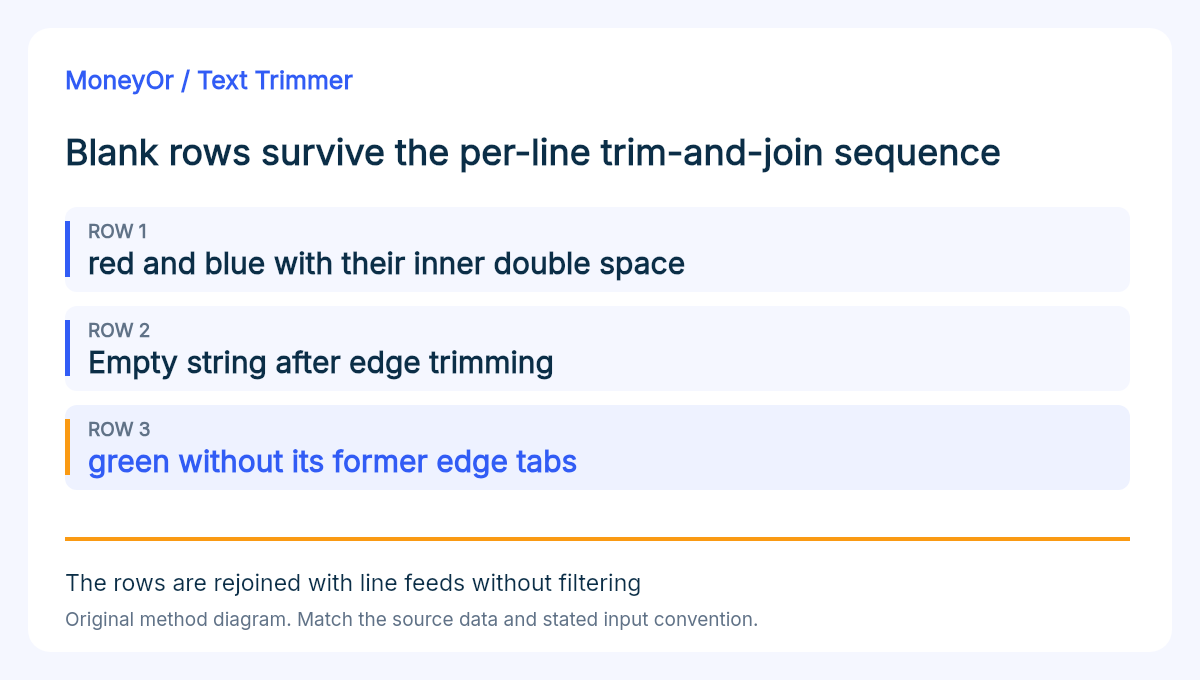
This sequence is different from applying a single trim to the whole source. Whole-source trimming could leave indentation on interior rows. MoneyOr deliberately processes each row, so interior line padding disappears. If only the first and last characters of the entire passage should be changed, the Text Trimmer is broader than your requirement.
MDN Web Docs' String.prototype.trim() explains both-edge whitespace removal. Its String.prototype.split() explains dividing strings into ordered pieces. Both references were checked on 26 November 2026. The checked examples show how the current tool combines these mechanisms per line.
When should I choose a different spacing operation?
Choose based on which information can be discarded. If only line-edge padding is unwanted, trimming is appropriate. If internal whitespace runs should become single spaces and empty rows should disappear, the Text Cleaner applies that broader pipeline.
If the input is wrapped prose and you need one flowing paragraph, the Line Break Remover replaces CR and LF runs with spaces. Trimming alone leaves the rows separate. It cannot infer that a line ending is an unwanted wrap rather than a paragraph boundary.
If every recognized whitespace character must be deleted, the Whitespace Remover performs that destructive compaction. It will also remove spaces between words. A trimmed result is much less aggressive because it retains those inner boundaries.
For a list that should become one line with a chosen separator, use the Text Joiner after checking whether empty rows and existing spaces should be retained. Joining and trimming are separate decisions. Applying either in the wrong order can obscure why repeated separators or extra gaps appear.
There is no need to apply every cleanup tool in sequence. Each operation should address a specific observed problem. When the source already meets the destination's requirements, preserving it is better than adding transformations whose effects will require another review.
Order matters when several operations are deliberately needed. Trimming before joining removes each original row's padding. Joining first can move that padding into the middle of one long string, where a later line-edge trim will leave it alone. Keep the intermediate output so you can see which step produced the final gaps.

Similarly, trimming a whitespace-only row leaves an empty segment that a joiner can connect with repeated separators. If that segment should disappear, blank-row removal is a separate decision. If it represents a missing value, retaining it may be essential. Do not use a cleaner simply to hide repeated separators without checking what they represent.
When can removing indentation or padding cause problems?
Indentation can show hierarchy in notes, define blocks in a programming language or align fields in a plain-text report. Trimming every row removes that leading structure. A result may still contain all the visible words while losing relationships between them. Keep structured or indented material out of a general trim unless the change is intentional.
Fixed-width records can use spaces to fill fields to a required width. Removing leading or trailing padding changes that representation. The result might be unsuitable for a system that expects exact positions or lengths. Use the record format's own export or editing process rather than treating padding as accidental.
Passwords and other sensitive values can also contain meaningful spaces, but a general web utility is not an appropriate place to experiment with real credentials. Use invented samples to understand the rule. More broadly, confirm whether edge whitespace is part of the value before modifying an identifier or machine-readable string.
For poetry or formatted quotations, indentation can be part of the intended presentation. Preserve the original and follow the relevant transcription or editorial requirements. A convenient trim does not decide whether changing the layout is acceptable.
If you are cleaning a table copied from a spreadsheet, prefer to keep the data in the spreadsheet until its fields are properly organized. Trimming one pasted column may be fine for a display copy, but it does not validate alignment with neighboring columns or repair an incomplete export.
Why might an invisible character remain at an edge?
The trim method removes a defined set of whitespace characters, not every character with little or no visible width. The checked zero-width-space example remains. A word joiner or another formatting mark can also require specific inspection. Identify what is present before deciding that it is an unwanted gap.
Some invisible marks are legitimate in multilingual writing or text layout. Their absence from trimming is not necessarily a defect, and deleting them can have consequences. A dedicated editor that displays code points can help distinguish a normal space from a different mark.
Likewise, a gap visible around text may come from the destination's margins, cell padding or paragraph settings. Those are layout properties rather than characters at the ends of the string. Trimming the text cannot remove the surrounding application's visual padding.
If trimming appears ineffective, test a short sample with visible letters and ordinary outer spaces. Compare that behavior with the unfamiliar source. This isolates whether the issue is a non-trimmable character, a destination formatting rule or an incomplete copy, without applying unrelated destructive cleanup.
Running the same trimmed candidate again will not make the method more selective or discover hidden meaning. Diagnose the specific remaining issue. Keep the original available so you can compare code points or layout rather than relying on visual memory.
What limits and processing details should I expect?
The input cap is 500,000 JavaScript string units. Checked ASCII samples confirm acceptance at that exact boundary and rejection at 500,001 units. UTF-16 units are not always the same as visible symbols, so the cap is not a word count or a guarantee about the number of displayed characters.
The Text Trimmer recognizes CRLF, CR and LF. Retained boundaries are written as LF in the result. If exact line-ending bytes matter to a file workflow, configure them explicitly in a suitable editor after reviewing the text. The trimmer is intended for text cleanup rather than faithful binary reproduction.
The Text Trimmer runs in the browser tool engine. Site delivery, analytics and broader practices are separate from the transformation. See the MoneyOr privacy policy for those practices and use nonsensitive sample text when checking unfamiliar behavior.
Before saving the output, inspect both edges of several representative rows, verify that internal gaps remain and confirm that blank rows are still where expected. Check the first and last rows after copying too. The destination may wrap text visually or apply its own formatting, so inspect the final saved representation.
For recurring cleanup, keep a small sample that includes an indented row, an internal double space, a tab between words and a blank row. That sample makes the intended distinctions visible when you revisit the task. It should contain invented labels so its use does not depend on sensitive real records.
More line trimming questions
Does trimming cut a paragraph to a shorter word count?
No. Here, trimming means removing line-edge whitespace. It does not summarize, shorten sentences or enforce a word allowance. Use an editor to revise wording when length rather than padding is the problem.
Can I remove only trailing spaces?
The Text Trimmer trims both sides of every row. It does not provide a trailing-only choice. Use a text editor with an explicit right-edge trim if leading indentation must be preserved.
Will two differently padded entries become the same record?
They may look identical after their outer spaces are removed, but both rows remain. The Text Trimmer does not merge records or decide identity. Review associated identifiers and context before deleting repeated-looking entries.
Does it change uppercase and lowercase letters?
No. Letter case is outside the trim operation. Existing capitals and lowercase letters remain. If case conversion is needed, apply it as a separate reviewed change and consider any names or identifiers. Trimming also leaves punctuation and digits in place, so it cannot correct a misspelled name or an incorrect numeric value.
How can I restore removed indentation?
Return to the saved source or normal editor history. The trimmed result does not record how many spaces or tabs were removed from each edge. Reconstructing meaningful indentation by guesswork can introduce errors.
Sources and practical review
MDN Web Docs, String.prototype.trim() and String.prototype.split(), checked 26 November 2026, are linked above. Keep the source, inspect retained inner spacing and approve the loss of line-edge padding before replacing your original list.