Timestamp Converter
Try Timestamp Converter
Loading calculator. If this message stays visible, enable JavaScript and reload.
Your result
This timestamp converter changes an entered UTC calendar date and clock minute into Unix seconds. Choose the date and time, then run the calculation. The entry 1970-01-01T00:00 gives 0 Unix seconds, while 1970-01-01T00:01 gives 60 Unix seconds. Every entered clock value is interpreted as UTC.
The date-time control does not supply a local time zone, even if its appearance follows your browser's regional formatting. If your source is a local appointment or log display, establish its UTC equivalent first. This guide explains that input contract, the minute-level precision and a practical reverse check so that a plausible-looking number does not conceal a wrong time basis.
On this page
- Timestamp Converter UTC date-to-seconds direction
- Timestamp Converter UTC input convention
- Timestamp Converter calendar-date validation
- Timestamp Converter epoch method and minute precision
- Which examples verify the epoch, leap day and later dates?
- How do you reverse-check a result or compare two entries?
- Which mistakes can produce a believable but wrong timestamp?
- How should you save a result and preserve its context?
- Frequently asked questions
- Sources
How to use the Timestamp Converter
Timestamp Converter UTC date-to-seconds direction
It takes a date and time and returns an epoch number in seconds. The page is intended for a supplied UTC date-time, such as a documented event time or a fixed test value. It does not take a numeric timestamp and display its date.
For that reverse operation, use the Unix timestamp converter. That page accepts seconds and returns a UTC date string. Choosing the correct direction matters because the two forms expect different kinds of input, despite the related names.
The Timestamp Converter has one date-time field labelled Date and time, interpreted as UTC. There is no switch for local input, no time-zone dropdown and no seconds field. Its output is a number followed by Unix seconds, making the output unit explicit.
The calculation is useful for creating a fixed time value in a test, checking a date supplied in UTC or comparing a calendar entry with a documented epoch field. It does not schedule an event, update an account or change the clock on your device.
Before using the result elsewhere, check what the destination requires. A system may expect milliseconds, a date string or a field with its own range restrictions. The number returned here follows the Timestamp Converter's seconds convention; it does not automatically adapt to every database or programming interface.
Timestamp Converter UTC input convention
The engine deliberately treats the selected date and minute as UTC. It appends a UTC marker while building the date internally, so the machine's local time zone does not silently determine the calculation. The visible label states that interpretation.
A local date-time control normally carries date and clock components without a zone. This page assigns those components a UTC meaning. Selecting noon therefore means noon UTC, rather than noon wherever your browser is currently located.
If your original record says 12:00 with a local-zone label, establish the corresponding UTC instant before filling the field. Do not enter the local clock components unchanged and later label the result as if the conversion had accounted for their zone. That would represent a different instant.
For a location that observes seasonal clock changes, a local clock reading can need additional context. Some local times can repeat or be skipped when offsets change. The Timestamp Converter has no location or ambiguity controls, so it cannot resolve those cases for you.
Keep the original local record and the rule or source used to establish UTC together if the conversion matters later. Once you have only an epoch number, the original display zone is no longer apparent. A correct numeric result cannot recover missing source-zone information.
Timestamp Converter calendar-date validation
Use the date-time control to choose the calendar date and hour and minute, then choose Calculate / Run. Check the year, month, day and clock portions before accepting the result. Browser formatting may vary, but the underlying input must represent the intended UTC components.
The Timestamp Converter accepts the form YYYY-MM-DDTHH:mm. It checks that parsing and converting back preserves those components. An impossible calendar day or invalid clock combination is rejected rather than silently becoming a different entered date.
For example, 29 February 2024 is a possible Gregorian calendar date, while 29 February 2025 is not. The leap year calculator can help inspect a year's leap-day status, although selecting a valid date remains necessary.
The Timestamp Converter requires a four-digit year representation in its input contract. It is not a free-text parser for phrases such as tomorrow morning, a month name or an offset-bearing string. Use the actual control rather than expecting it to interpret every date format encountered in a document.
If the browser or tool reports an error, correct the original date and minute deliberately. Do not adjust a day simply to obtain an accepted output. A one-day change represents a different instant, and the resulting timestamp may look ordinary even though it no longer answers the original question.
Timestamp Converter epoch method and minute precision
The selected calendar components are interpreted as a UTC browser date at zero seconds. The engine obtains milliseconds relative to the Unix epoch, divides by 1,000 and returns the whole-seconds result. The epoch is 1970-01-01 at 00:00:00 UTC.

Because the interface supplies a minute without seconds, every result describes the start of that selected UTC minute. It does not estimate where within the minute an event occurred. An original event at 12:00:37 cannot be preserved exactly by entering only 12:00.
| Input detail | Behaviour here | Practical implication |
|---|---|---|
| Calendar date | Used as entered in UTC | Recheck date if the source began as local time |
| Hours and minutes | Accepted from the control | Output identifies that minute's beginning |
| Seconds | Set to zero internally | Sub-minute source detail is not retained |
| Zone or offset | No selectable input | Resolve source-zone meaning beforehand |
| Output unit | Unix seconds | Do not label the number as milliseconds |
MDN's Date reference explains the browser's millisecond basis, and the ECMAScript specification defines its time-value model. Those primary technical references were checked in 2026. The model does not expose leap seconds as a separate clock value in the Timestamp Converter.
The number is an instant's coordinate, not a formatted date. A consuming application may display it in another zone while preserving the same instant. For example, a report and its underlying database can use different date presentations without storing different event times. Compare their documented conventions before changing stored values solely to align the visible clock text. Keep unit conversion and display formatting distinct when diagnosing a later difference.
Which examples verify the epoch, leap day and later dates?
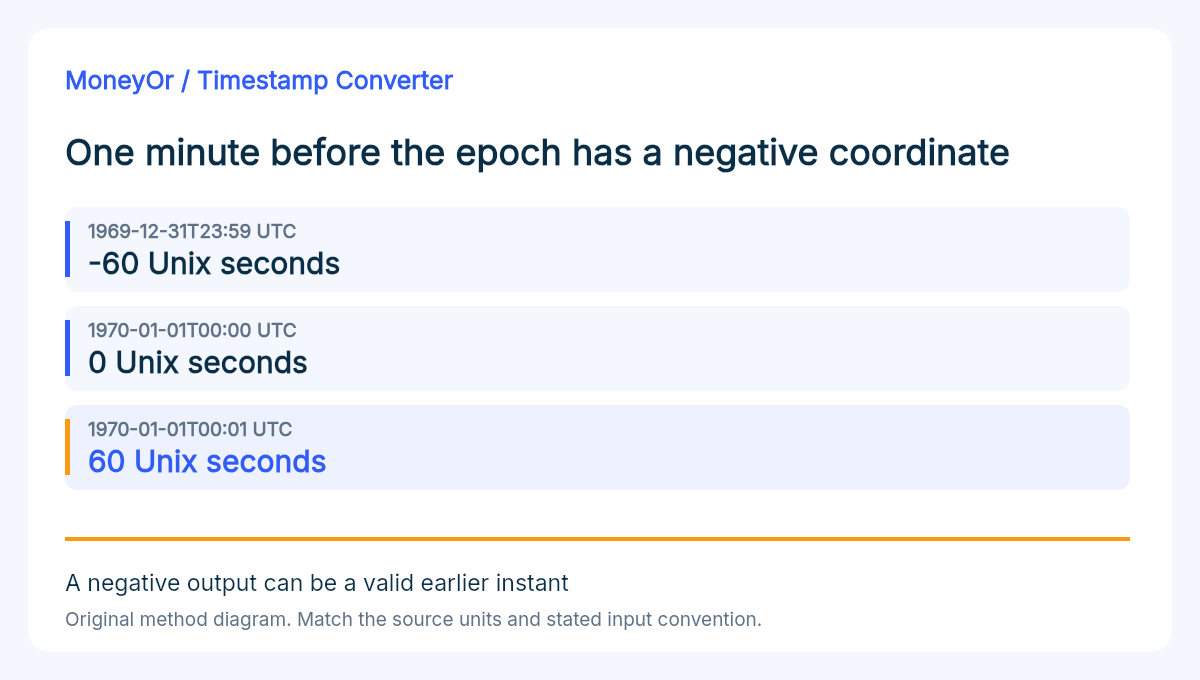
The epoch example is 1970-01-01T00:00, which returns 0 Unix seconds. Moving one minute forward to 1970-01-01T00:01 returns 60 Unix seconds. These two fixed entries verify both the starting point and the seconds output unit.
One minute before the epoch, 1969-12-31T23:59, returns −60 Unix seconds. A negative value is therefore expected for this earlier date. It does not mean that the calculation failed or that the Timestamp Converter requires every date to come after 1970.
For a leap-day example, 2024-02-29T12:30 gives 1709209800 Unix seconds. The input is a real date in a leap year. Changing the year alone to a non-leap year would make that day invalid rather than preserving a valid recurring calendar entry.
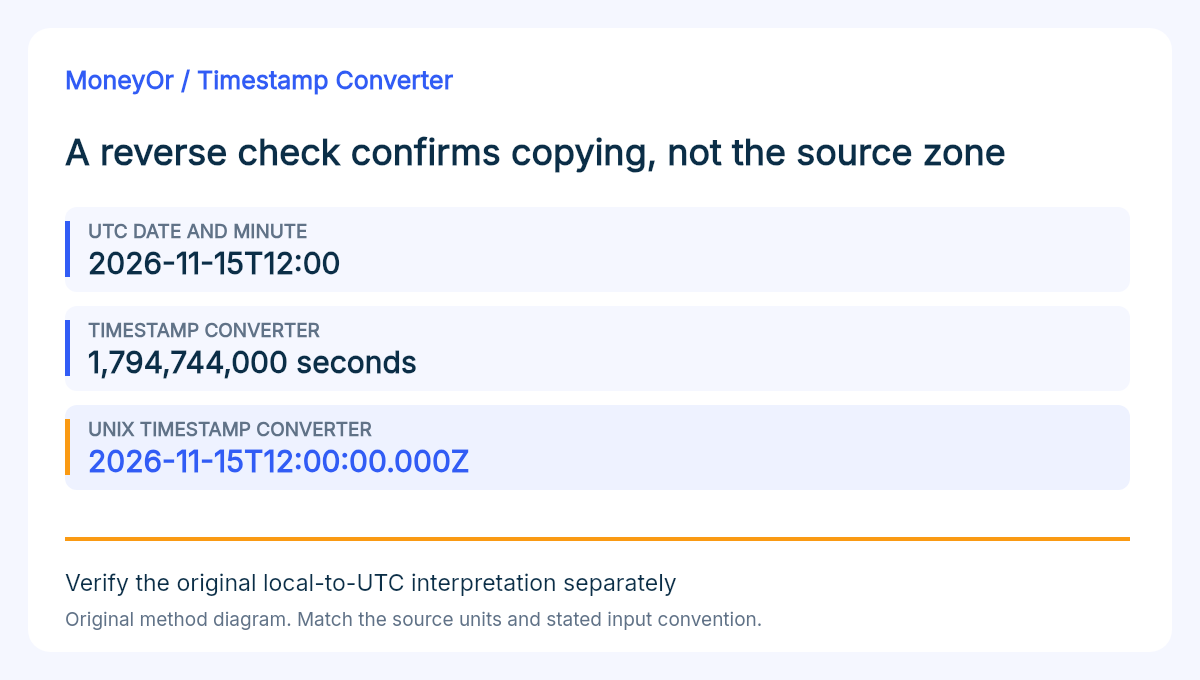
The fixed entry 2026-11-15T12:00 gives 1794744000 Unix seconds. This example does not mean the page displays the current time. It produces the same result whenever those exact UTC components are entered, which makes it useful for a reproducible comparison.
The entry 2038-01-19T03:15 gives 2147483700 Unix seconds. This passes the familiar signed 32-bit seconds threshold, demonstrating that this browser calculation is not restricted to that storage type. A separate system receiving the number can still have its own limitation.
How do you reverse-check a result or compare two entries?
Take the returned seconds number and enter it into the Unix timestamp converter. For 1794744000, the reverse page returns 2026-11-15T12:00:00.000Z. Compare the date, hour and minute with the intended UTC input. The zero seconds reflect this form's precision.
A reverse check can confirm the calculation direction and copied number. It cannot prove that the original local-to-UTC interpretation was right, because both tools can consistently process the same mistaken UTC components. Verify the source meaning as a separate step.
To compare two UTC entries, calculate each timestamp and subtract earlier from later. An interval from 2026-11-15T10:45 to 2026-11-15T12:00 spans 75 minutes, or 4,500 seconds. The timestamps are 1794739500 and 1794744000 respectively.
The basic calculator can check that subtraction. The time duration calculator suits a simpler clock interval under its own same-day and overnight rules, but it does not establish the time zone of an event.
For dates without clock components, use the date difference calculator when a calendar-day gap is the actual question. Do not treat an instant comparison and a date-label comparison as interchangeable, especially when local dates or midnight boundaries differ.
Which mistakes can produce a believable but wrong timestamp?
The most common interpretation mistake is entering local clock components as if they were UTC. The result can be numerically valid and still refer to the wrong instant. A successful calculation checks the supplied components, not the truth of the source assumption.
Another mistake is calling the seconds result milliseconds. If a destination expects milliseconds, it needs the appropriate conversion and a confirmed field definition. Multiplying by 1,000 changes the numeric unit; it does not fix an incorrect date or time-zone interpretation.
A copied date can also swap day and month when it began in an ambiguous written format. Use the source context and the control's labelled parts to resolve that ambiguity. A date such as 4 May and a date such as 5 April may both be valid calendar entries.
Minute-level input can hide an expectation mismatch. If you compare this result with a source event that includes seconds, a difference under a minute may reflect omitted detail. Do not adjust the selected minute to make numbers match without understanding what precision each source carries.
The form does not verify a device clock, establish event authenticity or account for processing delays between systems. Treat its output as the conversion of an explicitly interpreted input. For an audit trail, preserve the original source and its precision rather than relying only on a copied seconds value.
How should you save a result and preserve its context?
Save the chosen UTC date and minute alongside the returned seconds. Include the word UTC in your notes, even if the control itself displayed a familiar regional date format. That small detail lets another reader reproduce the input interpretation.
Copy result copies the main output. Download CSV includes the result and tool identifier, plus a saved baseline if one exists. The export does not automatically preserve the original date-time field, so record that input separately when it needs to be traceable.
Save as baseline keeps a result in the current page session. Here the output includes the words Unix seconds, so the displayed comparison does not calculate a numeric elapsed interval. Subtract the original numeric results deliberately when you need the duration between two entries.
Reset fields clears the result and baseline. The calculation runs in your browser, and using this tool does not require an account. Read the privacy policy for website delivery and broader data practices.
Before placing the output in a test, API request or worksheet, recheck the destination's unit and allowed dates. Also retain any original zone conversion or source precision notes. A reproducible timestamp record contains enough context to explain why that particular UTC minute was selected.
Frequently asked questions
Will changing my computer time zone change the entered UTC interpretation?
The implementation constructs the date with an explicit UTC basis, so it does not use the computer zone to reinterpret the selected components. The browser control may look different by locale, which makes checking its displayed date and clock parts worthwhile.
Can I enter a time with an explicit offset?
The accepted form is a date and minute without an offset suffix. The page assigns UTC to those components. Convert an offset-bearing source to its UTC equivalent first, using a method appropriate to that source, rather than pasting an unsupported string into this control.
Can this tool create recurring schedule timestamps?
It returns one timestamp for one chosen UTC date and minute. It does not generate a recurring calendar or apply future local daylight-saving rules. Each scheduled occurrence needs its own correctly established instant if those rules affect your task.
Does zero mean an empty or missing time?
In this output convention, zero is a valid value for 1970-01-01 at 00:00 UTC. A separate application might use special sentinel values, but this converter does not determine those application rules. Distinguish a legitimate epoch value from a missing field.
Is the output ready to paste into every API?
Check the API documentation first. Some interfaces require seconds, others milliseconds or a formatted string, and their accepted ranges differ. Preserve the documented field type and unit instead of assuming that any numeric date representation can be substituted.
Can I recover omitted seconds from the returned number?
No. This input records the beginning of the selected minute. If the original event had a seconds component, that information was never supplied here. Retain the original record and use a suitable higher-precision method when those seconds matter.
Sources
- MDN Web Docs: Date. Reference checked 26 November 2026.
- Ecma TC39: ECMAScript Language Specification: Time Values and Time Range. Reference checked 26 November 2026.