Mirror text
Try Mirror Text
Loading calculator. If this message stays visible, enable JavaScript and reload.
Your result
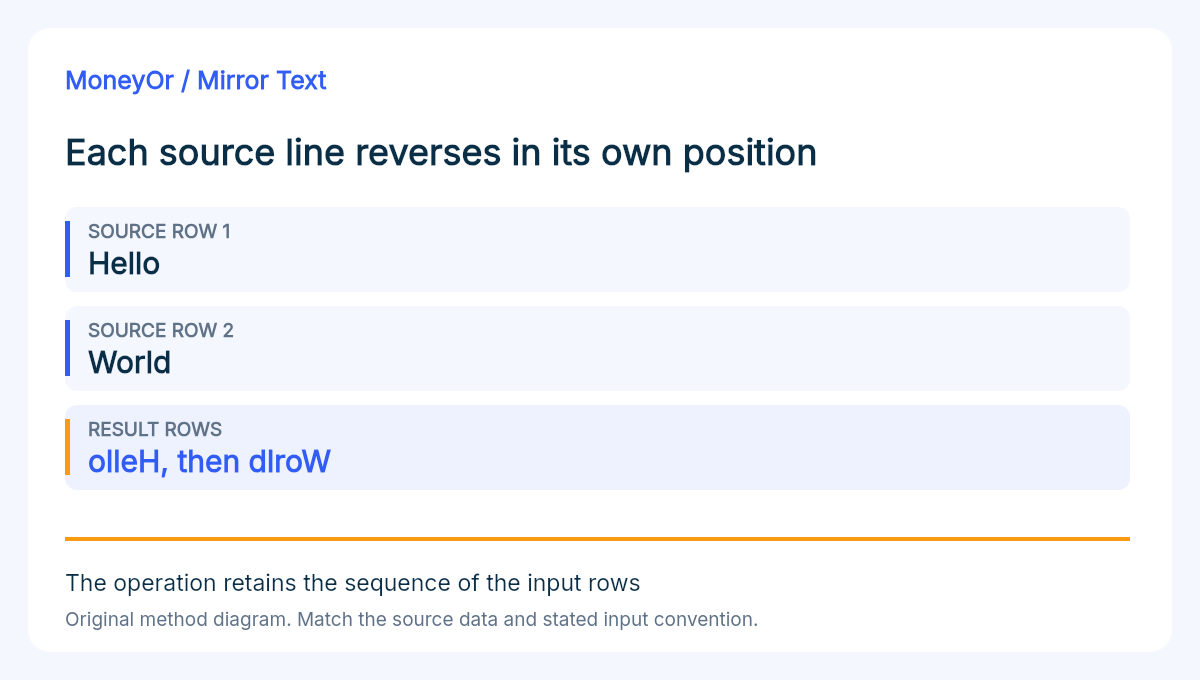
MoneyOr's mirror text operation reverses the Unicode code points within each line and keeps the lines in their existing order. For example, Hello becomes olleH. It returns ordinary text characters in a different sequence. It does not draw reflected letter shapes, substitute decorative Unicode alphabets or generate a mirrored image.
Use it for a simple backwards-text exercise, a line-based puzzle or an experiment with character order. The distinction between a text sequence and a visual reflection matters: reversing letters does not automatically create suitable artwork for printing, transfers or a design that must read correctly in a physical mirror.
On this page
- Mirror Text per-line code-point scope
- Mirror Text source-line preparation
- Mirror Text checked reversal examples
- Mirror Text combining marks and grapheme limits
- How is this different from a visual mirror, upside-down text or translation?
- When is line-by-line reversal useful?
- How can I check the output before sharing it?
- What should I know about limits and privacy?
- Frequently asked questions
- Sources and method notes
Mirror Text guide and examples
Mirror Text per-line code-point scope
The mirror text tool processes each line independently. The first line remains first and the second line remains second. Within each line, the last code point becomes the first, followed by the next-to-last, until the original first code point becomes the last.
There is no substitution table for reflected letter shapes. A lowercase b stays b, an uppercase R stays R and a digit stays that digit. Their positions change. A bracket also keeps its original character identity, so reversing a bracketed phrase can leave the closing bracket at the beginning.

The input is divided at CRLF, CR or LF boundaries and output lines are joined with LF. Empty lines remain at their corresponding positions. Leading and trailing spaces within a line participate in reversal, so padding on one side can move to the other.
The related Reverse Text operation is useful when considering a different reversal scope. Check that tool's behaviour before choosing it. Reversing one complete multiline string and reversing each line independently produce different arrangements of the lines.
Mirror Text source-line preparation
Begin with a short sample whose characters are easy to recognize. Plain Latin letters and simple punctuation make the Mirror Text visible without the additional complications of combining marks or joined emoji. Keep the original nearby so you can compare the result.
- Enter or paste the source in Your text.
- Make sure intended line boundaries are actual newlines.
- Run the operation.
- Compare the contents of each line with its source line.
- Confirm that line positions and blank separators remain correct.
- Inspect the result again in the destination where it will be used.
A narrow text area can wrap a long line visually. That wrap does not make a new line in the source. If you need independent reversal of two phrases, insert a real newline between them. Otherwise the Mirror Text reverses both phrases as one continuous line.
For puzzles, provide the normal version separately when readers need an accessible alternative. A backwards phrase can be a deliberate challenge, but it is a poor replacement for essential directions, an address or a form label that people need to read quickly.
Do not prepare the source by removing spaces automatically. Spaces are part of the sequence, and their reversed placement is often what makes a phrase recognizable as backwards text. Altering them first creates a different exercise from reversing the original.
Mirror Text checked reversal examples
The examples below were checked in code against the Mirror Text. They describe the output sequence, which can be more precise than its visual appearance. Fonts and rendering systems can change how adjacent Unicode characters appear on a screen.
| Source | Checked result | Interpretation |
|---|---|---|
| Hello, newline, World | olleH, newline, dlroW | Each row reverses in place. |
| ab, empty row, cd | ba, empty row, dc | The empty separator remains. |
| space, ab, space | space, ba, space | Spaces are included. |
| A😀B | B😀A | A single supplementary emoji code point stays intact. |
| (ab) | )ba( | Bracket characters are reordered without substitution. |
| ab with CRLF, cd with CR, ef | ba, dc, fe joined by LF | Line-ending representation is normalized. |
Source:
Hello
World

Result:
olleH
dlroW
The first result is not dlroW followed by olleH. That would reverse the line sequence as well. This distinction is helpful when a poem, set of labels or classroom worksheet needs its existing row arrangement to survive.
The supplementary emoji example is deliberately simple. It demonstrates code-point handling, not universal emoji safety. Emoji formed from several code points can behave differently, even though they look like one symbol before processing.
A result containing spaces is easiest to check in a plain-text editor with visible whitespace. Ordinary web layout may collapse consecutive spaces outside a preformatted block. Apparent spacing in a screenshot is therefore not always enough to establish the exact returned string.
Mirror Text combining marks and grapheme limits
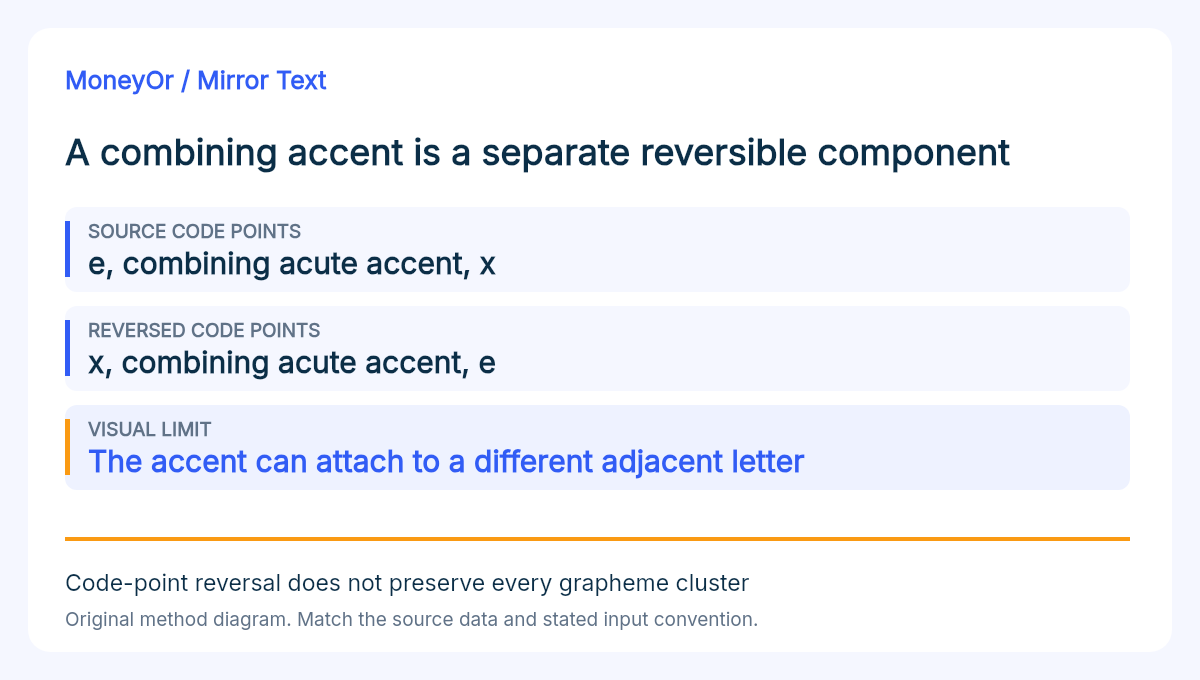
A code point is not always a complete visible character. Some visible characters combine a base letter with a mark. Others use several code points joined into one emoji or shaped cluster. Reversing the components can separate or reorder those parts.
For example, a source consisting of e, a combining acute accent and x reverses to x, the combining acute accent and e. Depending on rendering, the accent may now appear with the x. This is different from treating the original accented letter as one indivisible visual unit.
A joined emoji has the same general problem. The components of the woman-technologist emoji include a woman, a joining character and a laptop. Code-point reversal changes their sequence. A device might display separated components or a different-looking result rather than the original joined symbol.
The Mirror Text uses code-point iteration rather than splitting the string into individual UTF-16 code units. This avoids one class of splitting, but it does not make the operation grapheme-aware. A grapheme cluster is a sequence a reader may perceive as one character.
The Unicode Consortium's text segmentation specification explains grapheme boundaries. For the Mirror Text, the practical rule is to inspect any input containing combining marks, joined emoji or scripts with complex shaping. Use a grapheme-aware method if intact visual clusters are a requirement.
How is this different from a visual mirror, upside-down text or translation?
A visual mirror reflects shapes. A graphics editor can reflect a rendered text object or image horizontally. That transformation changes the appearance of the glyphs. The Mirror Text changes a character sequence and leaves each character's identity unchanged.
Decorative text generators often substitute lookalike Unicode characters to suggest flipped letters. Such a substitution can create an approximate visual effect, but it also changes the underlying text. MoneyOr does not apply that kind of alphabet mapping in the Mirror Text.
Upside-down text is another effect. Rotating a rendered image and substituting characters that resemble rotated letters are both different from reversal. Decide which output format the destination requires before selecting a transformation.
Text direction is different again. Languages written from right to left have their own ordering and shaping behaviour. Reversing their code points is not a translation, a direction-setting command or a reliable repair for bidirectional display problems. Use proper language and layout support for those tasks.
For print transfers or cutting-machine artwork, work in the actual design application and inspect its preview at the required size. A reversed plain-text string cannot establish the final shape, alignment or production orientation of a design. Font choice and layout remain part of that job.
When is line-by-line reversal useful?
A classroom exercise can use it to demonstrate the difference between stored sequence and displayed appearance. Start with simple words, then compare punctuation and multi-code-point characters. Keep the scope clear so students understand why some examples behave differently.
A puzzle author can reverse each clue without reversing the clue order. Blank lines can continue separating groups of clues. Test the finished worksheet in its final font, because a character that is readable in the input box may look ambiguous on a printed page.
A developer can use short synthetic strings to inspect a text pipeline. Include a known first and last character, a space and a newline to make accidental whole-string reversal or lost boundaries easier to see. Use artificial examples rather than confidential user records.
For communication exercises, a spelling aid may be more appropriate than backwards text. The NATO Phonetic Alphabet Converter produces letter-spelling words, while the Morse Code Converter represents supported letters and digits with dots and dashes. Neither should be confused with visual reflection.
Keep important information available in normal order. A decorative reversal can be useful as optional content, but it makes searching, reading aloud and recognizing a phrase harder. Readers should not have to decode reversed text to complete an essential action.
How can I check the output before sharing it?
Compare one source line with its output from the outside inward. The source's last code point should be first, its first should be last and the line should retain its position. Check punctuation and spaces, not just letters.
Use the Line Counter when investigating hard boundaries, remembering that visible wrapping is a display effect. A source that looks like several screen rows may still contain only one actual text line.
If counts are useful, the Character Counter provides a separate view of the text. Read its counting definition before comparing totals, because code points, code units and visible clusters are different units. A matching count alone cannot prove that a reversal preserved the intended visual characters.
Try pasting the result into the actual destination. Messaging software, word processors and design apps may apply their own shaping, direction rules or whitespace handling. Preserve a normal-order copy alongside the reversed version so you can distinguish a transformation issue from a rendering issue.
For a reversible simple sample, running the Mirror Text twice restores character order within each line. It does not restore the original line-ending bytes, since output boundaries are normalized. That distinction matters in a technical comparison even when the text looks restored.
When testing a phrase with several spaces, distinguish a source space from a visual gap introduced by a font. Copy the returned string into a plain-text editor and inspect whitespace there. Reversing a line beginning with two spaces puts those spaces at its end; some destinations may hide or strip that trailing padding.
Check hyperlinks and identifiers as ordinary strings. Reversing the text of a URL does not create a working address, and reversing an email address does not validate it. If a puzzle includes one of these strings, label it as a clue and keep the real destination available separately.
What should I know about limits and privacy?
The text helper rejects input beyond 500,000 JavaScript string units. Large inputs may still be uncomfortable to inspect on a small screen. Work with a representative sample first and keep an original copy before transforming a long document.
Reversal provides no confidentiality. Anyone who recognizes the pattern can reverse it again. It should never be used to conceal a password, recovery code, private message or personal record. A harder-to-read string is not encrypted.
A reversal also makes ordinary search and comparison less convenient. A reader searching for a normal-order word may not find its reversed form. If the result is published as part of a lesson, give it enough surrounding explanation to make its purpose clear without requiring the reader to solve the example first.
For an exercise involving unfamiliar scripts, ask what the transformation is meant to demonstrate. A broken cluster may illustrate a technical boundary, but it should not be presented as correct writing in that language. Retain the original spelling and explain the sequence change explicitly.
The Mirror Text runs in the browser. That describes the computation, not all website activity. The MoneyOr privacy policy covers broader site practices. Avoid pasting confidential material into a general-purpose web page when a small synthetic example can answer the same question.
Use the returned text when code-point order is the feature you want to explore. If your requirement is intact visual clusters, reflected artwork or correct right-to-left typography, choose a method designed for that requirement and inspect its final output.
A short, clearly labelled example is usually easier to understand than a full document transformed without an explanation of the intended effect.
Frequently asked questions
Will this turn b into d?
No. Character identities are retained. A b can move to a different position but remains b. A tool that substitutes mirror-like glyphs is carrying out a different operation and can produce different searchable text.
Can it reveal an existing mirror image?
No. The input is text, not an image. A photograph of reflected writing needs image reflection or an appropriate recognition workflow. Pasting recognized text here only reverses the character sequence supplied to the Mirror Text.
Why do brackets appear on the wrong sides?
Each bracket is an ordinary character in the reversal. The operation does not replace an opening bracket with a closing bracket. If the destination has bidirectional rendering, appearance can be more complicated, so inspect the underlying sequence as well as the display.
Does the output preserve bold text and fonts?
No rich formatting is produced by the operation. It works with a text string. Styling in the source document is not a character and should be managed in the destination editor after confirming the returned text.
Can I use the result as the only label on a button?
Use readable normal-order wording for essential controls. Reversed text can make a control difficult to identify, search for or read aloud. If a backwards version is part of a puzzle, provide an ordinary label that still explains the action.
Sources and method notes
References checked 26 November 2026: Unicode text segmentation. These references explain the underlying method. The Mirror Text uses the implementation and limitations described above; a reference does not certify an entered record or its destination.