Torque Converter
Try Torque Converter
Loading calculator. If this message stays visible, enable JavaScript and reload.
Your result
Use this Torque Converter for an amount already stated in newton-metres, foot-pounds-force or inch-pounds-force. Select the input unit and your desired output unit. For example, 10 N·m becomes 7.37562149 ft·lbf, and 240 in·lbf becomes 27.11635896 N·m.
Identify the full source unit before entering the number. Inch-pounds-force and foot-pounds-force use the same force unit but measure the length part on different scales. If a reading has a sign, keep the corresponding axis convention. The Torque Converter changes the unit while preserving what your original number describes.
On this page
- Torque Converter supported torque units
- Torque Converter amount and direction inputs
- Torque Converter rounded inch-to-foot factors
- Torque Converter checked torque examples
- How do force and the lever arm produce a torque?
- How does torque differ from energy or power?
- What should stay with a torque measurement after conversion?
- How do you save a result or check it against a baseline?
- Frequently asked questions
- Sources
How to use the Torque Converter
Torque Converter supported torque units
The Torque Converter offers N·m, ft·lbf and in·lbf in both menus. N·m means newton-metre, ft·lbf means foot-pound-force and in·lbf means inch-pound-force. A specification may write lbf·ft or lbf·in in the opposite textual order. Check the stated quantity and full unit as you choose the matching option.
The central dot means multiplication. A torque unit combines a force scale and a distance scale. A label in lbf by itself describes force. A label in lbf per foot has a length in the denominator and describes a different rate per length. The distance multiplier in a torque unit matters.
Keep an eye on SI prefixes and letter case. N·m means a newton multiplied by a metre. A value in a prefixed unit such as kN·m is outside the selector list. Apply the correct prefix factor separately to express it in N·m before entering it.
Other torque units, including kgf·cm, kgf·m and ozf·in, are outside the menus. If a manual uses one of them, start from the applicable reference. Keep that factor separate from the conversion performed by the Torque Converter so a later reader can follow both steps.
The Torque Converter expects an already known torque value. Use the force converter for a standalone force and the length converter for a standalone distance.
Torque Converter amount and direction inputs
Enter the numerical amount without the unit symbol. Choose the source from From unit and the requested scale from To unit. Select Calculate / Run. The result gives the converted amount with its unit, and the factor line shows the target value for one source unit.
For a reading of 40 ft·lbf, enter 40, select ft·lbf as the source and N·m as the target. The answer is 54.23271793 N·m. The unit you choose for the original reading controls which quantity the number 40 denotes. Changing only the target never fixes a mislabeled source.
A signed value can represent a torque component about an axis. If -4 ft·lbf is the signed input, choosing N·m gives -5.42327179 N·m. The conversion factors are positive, so the sign is retained. The axis and positive direction still come from your source.
Type a decimal point for a fractional amount and omit grouping commas. Enter 0 explicitly if the source represents zero torque. A blank input cannot stand for a zero measurement. Using the same unit on both sides gives a factor of one.
When transferring a torque value from a layout or report, read the column heading before copying the amount. A nearby column could refer to force, angle, speed or an alternative torque scale.
Torque Converter rounded inch-to-foot factors
The physical inch-to-foot relationship gives twelve inch-pounds-force per foot-pound-force. The two units share pound-force, and a foot contains twelve inches. Divide an inch-pound-force amount by twelve to express its exact relationship in foot-pounds-force.
The engine uses newton-metres as an intermediate scale. It multiplies by the stored source factor and divides by the stored target factor. Its factors are 1 for N·m, 1.3558179483 for ft·lbf and 0.112984829 for in·lbf. NIST lists the corresponding torque conversion factors at a shorter published precision.
The two stored non-SI factors are rounded independently. Twelve times the stored inch-pound factor is 1.355817948, slightly below the stored foot-pound factor. A direct conversion using that ratio can show a tiny difference at eight decimal places. For example, 12 ft·lbf displays as 144.00000003 in·lbf. The physical identity gives precisely 144 in·lbf.

For an exact inch-to-foot unit relationship in a worksheet, use twelve directly. The basic calculator can check the separate multiplication or division. Preserve the original value when your next step depends on exact unit definitions.
The displayed factor itself is rounded. A line showing approximately twelve does not display every digit of the internal stored-factor ratio. Compare physical values at the precision needed for the task.
Torque Converter checked torque examples
Try the rows below to check the three source units, both direction patterns and a same-unit case. The result column represents the page’s normal formatted numeric precision. The final column gives an independent way to anticipate the scale.
| Source reading | Target unit | Expected display | Check |
|---|---|---|---|
| 10 N·m | ft·lbf | 7.37562149 ft·lbf | Divide by about 1.356 |
| 40 ft·lbf | N·m | 54.23271793 N·m | Multiply by about 1.356 |
| 240 in·lbf | N·m | 27.11635896 N·m | Multiply by about 0.113 |
| 120 in·lbf | ft·lbf | 10 ft·lbf | Expect roughly one twelfth |
| 12 ft·lbf | in·lbf | 144.00000003 in·lbf | Stored-factor result near 144 |
| -4 ft·lbf | N·m | -5.42327179 N·m | Multiply and keep the sign |
| 7.5 N·m | N·m | 7.5 N·m | Factor of one |
As a scale check, for the same positive torque the numeric amount in in·lbf should be larger than the amount in ft·lbf. For the same positive amount in N·m, converting to ft·lbf reduces the number. Reading the number together with the unit helps detect a selector error quickly.
The reporting precision depends on the source. A force transducer or torque instrument may record fewer significant digits than the conversion displays. Record the longer result only if that precision serves a documented downstream calculation. For a final statement, match the intended precision of the source or applicable procedure.
How do force and the lever arm produce a torque?
Torque describes the turning effect of a force about a chosen point or axis. OpenStax explains its magnitude using force, distance from the point of rotation to the point of application and the angle between the position vector and force. For a perpendicular force, the magnitude is the force times the distance.
For a classroom example, a perpendicular force of 20 N acting 0.25 m from an axis produces a torque magnitude of 5 N·m. If the force acts at another angle, use the appropriate perpendicular lever arm or the sine relation described in the physics source. Calculate that quantity separately before selecting N·m in the Torque Converter.

Use a consistent length and force scale for the multiplication. Multiplying newtons by metres gives newton-metres. Multiplying pounds-force by inches gives inch-pounds-force. If a sketch gives a force and a distance in different measurement systems, convert one or both quantities before combining them.
For a signed component, first choose the axis and sign convention and decide whether each force produces a positive or negative torque. A converter preserves the sign it receives. It contains no geometry, force-angle input or information about the physical arrangement.
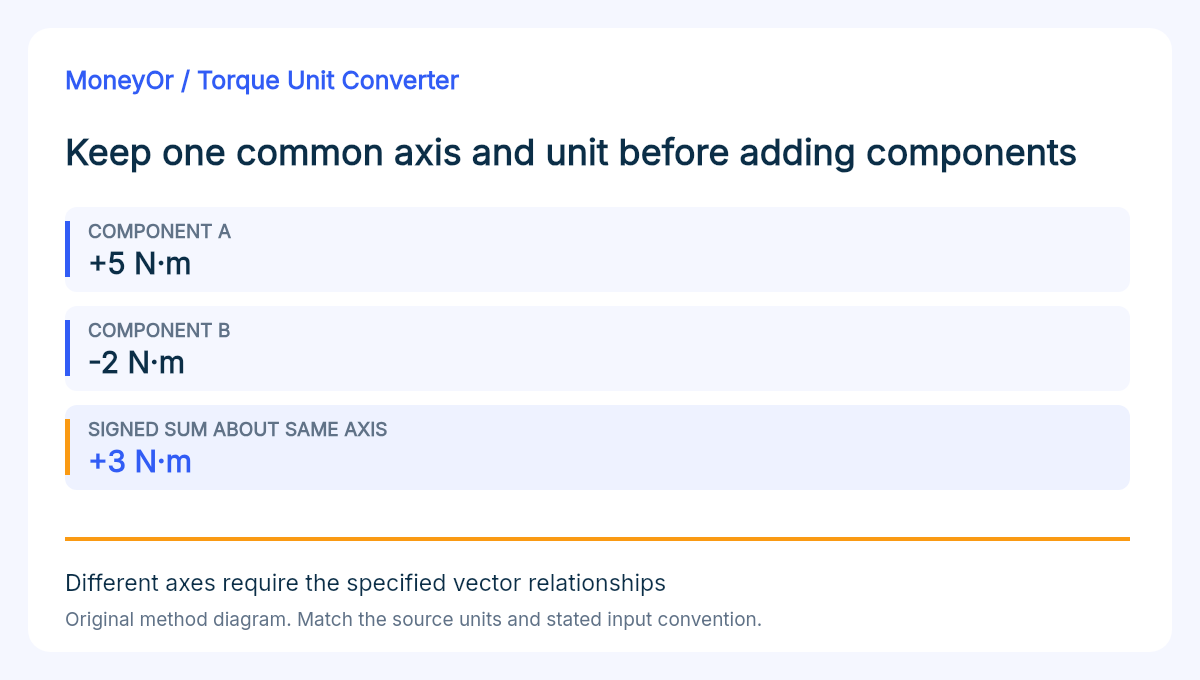
Consider a diagram with two perpendicular forces about the same axis. One produces a component of 5 N·m in the positive sense and the other produces -2 N·m. The signed sum is 3 N·m. If one term arrives in inch-pounds-force, convert it before adding. Keep the terms separate until both use the same axis and sign convention. For terms from different axes, use the vector relationships that the problem specifies before combining a component or magnitude. The Torque Converter only changes the scale of each individual number.
Keep the difference between a force at a point and a measured torque reading explicit. A torque measurement already incorporates the relevant setup. A force reading needs the moment arm or equivalent geometry before it can be used as torque.
How does torque differ from energy or power?
Torque and work can both involve force and distance in their SI dimensions. Torque describes the turning effect around an axis, while work describes a transfer of energy. A torque is written in N·m. A measured amount of work or energy is commonly written in joules. The symbol choice helps identify which quantity a report refers to.
A stationary configuration can have torque about an axis without rotating. A work calculation involving rotation requires information about the angular displacement and the torque over that displacement. A power calculation for rotation also requires information about angular speed. The amount entered here supplies only the torque term.
Use the energy converter after an energy amount has been established. Use the power unit converter for a known power figure. If the angle itself requires a unit change, the angle converter can handle supported degree, radian and turn values.
When a worksheet has all three quantities, keep their labels explicit. A reading of N·m may appear next to a shaft power in W or a work estimate in J. Although related physical equations exist, each column gives different information about the setup. Converting units only changes the scale of the one selected quantity.
What should stay with a torque measurement after conversion?
Record the original amount, the full original unit, the converted amount and the target unit. For a signed measurement, include the axis and direction convention. For a series, identify the condition under which each value was acquired. A converted reading can still describe a peak, an average, a static setting or another documented quantity.
For an existing specification or measurement, give the target unit at the precision the source requires. A converted reading does not establish a new specification, verify a torque instrument’s calibration or resolve which condition a document intended. Check the original reference if two sources disagree.
Keep tolerances distinct from the nominal amount. If the source gives a nominal torque and a separate unit-based tolerance, apply the same unit relation to each magnitude. If the tolerance is a percentage, it remains the same percentage when both the nominal and absolute quantities are scaled consistently.
When you compare numbers from different reports, choose one unit first and keep their measurement bases. Two rounded values can display the same digits after conversion even when the unrounded amounts differ. Preserve any exact or original readings that another step may need.
Round once at the point where a value enters its final document. A back-conversion from a short displayed value can have a small numerical difference even when the selectors are correct.
How do you save a result or check it against a baseline?
Copy result includes the displayed amount and factor. Download CSV saves a result record with the Torque Converter identifier and available details. Add the original measurement, axis, conditions and any precision requirement in your own record. The file does not carry those items from a source you did not enter.
Save as baseline remembers the displayed result during the current page session. Set the next conversion to the same target unit before interpreting a difference. When the target labels differ, make a separate unit conversion so the two numbers are on a single scale. Reset fields clears the current result and baseline.
If the main purpose is comparison, keep source and target units in separate labelled worksheet columns. For a quick visual check, group readings by the same target and sort only after confirming that the values are parsed as numbers.
The browser converts an amount using the two selected units. You can transcribe the number and unit without including the rest of a maintenance report or laboratory data set. Use the source document as the record of the actual specification or measurement.
Frequently asked questions
Are ft·lbf and lbf·ft equivalent in a torque specification?
Both notations can mean force times distance, with the factors written in opposite order. Confirm that the document is describing torque before selecting ft·lbf.
How many inch-pounds-force are in one foot-pound-force?
The physical relationship is exactly twelve. This page uses rounded stored factors, so a sufficiently detailed displayed result can differ from the exact relation in its last decimal places.
Does a minus sign always mean clockwise torque?
Its meaning depends on the axis and sign convention. In a planar problem, the viewpoint can also affect which movement appears clockwise. Retain the convention from the original measurement.
Can I enter kilogram-force centimetres?
The Torque Converter has three supported units. Apply the referenced conversion from kilogram-force centimetres to an available unit separately and enter that converted amount.
Can the result identify the right torque setting?
The page converts a specified or measured torque. A required setting depends on the procedure, application and source specifications. Read that setting from the relevant document before changing its unit.
Can I calculate torque from lever length alone?
A lever length alone leaves out force magnitude and direction. Establish the torque using the appropriate geometry and force information, then convert its unit here.
Sources
- NIST: Guide to the SI, Appendix B.9 Factors by Kind of Quantity. Reference checked 26 November 2026.
- OpenStax: University Physics Volume 1, 10.6 Torque. Reference checked 26 November 2026.