Text repeater
Try Text Repeater
Loading calculator. If this message stays visible, enable JavaScript and reload.
Your result
The text repeater creates a plain-text block containing repeated copies of your source, with a separator between adjacent copies. MoneyOr accepts a whole-number count from 1 to 200. It checks the combined output length before generating the result, with a maximum of 500,000 JavaScript string units.
Use it for a small test fixture, a deliberate decorative pattern or repeated placeholder text in your own draft. It generates a result for you to inspect; it does not send messages, automate a chat application or guarantee acceptance by another platform. Choose a modest count, verify the separator and check that the resulting block is suitable for its destination.
On this page
- Text Repeater complete-source repetition
- Text Repeater source, count and separator inputs
- Text Repeater count and output-size limits
- Text Repeater UTF-16 output-length formula
- What happens when the source already has multiple lines?
- What are useful ways to apply repeated text?
- How can I verify the result before copying it?
- What processing limits and references apply?
- Repetition questions
- Source and output check
Text Repeater guide and examples
Text Repeater complete-source repetition
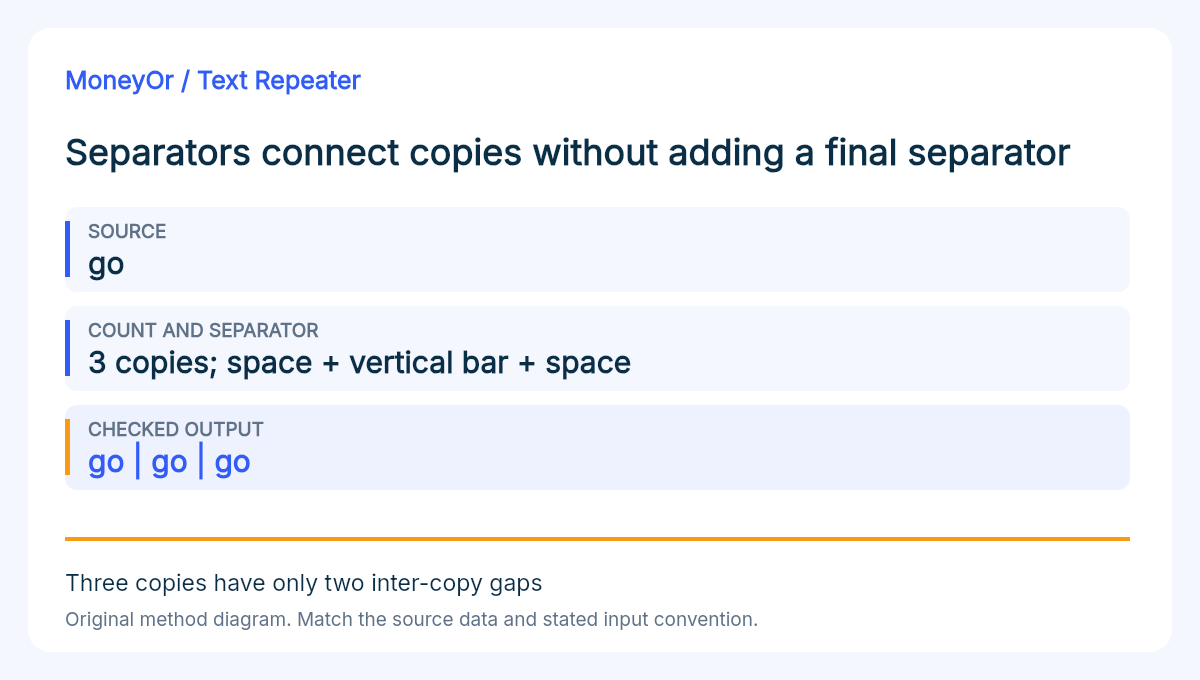
The text repeater copies the complete source string the requested number of times. The separator is inserted only between copies. There is no automatically added separator before the first copy or after the last. Existing spaces, punctuation, emoji and line endings inside the source remain part of every copy.
With source go, count 3 and separator | , the checked result is go | go | go. With an empty separator and source ha, three copies produce hahaha. The difference comes entirely from the separator, not from any interpretation of the source words.
The Text Repeater does not add numbering or change letter case. If the source already contains a number, that same number appears in each copy. Use the Number Sequence Generator for a progression of changing numbers rather than expecting text repetition to increment them.
Text Repeater source, count and separator inputs
Enter the exact source you want duplicated, choose the count and set the separator deliberately. A space makes copies look like words in a sentence. A comma with a following space makes a simple display list. An empty separator creates a continuous string. The Text Repeater does not add extra spacing beyond what you entered.
- Start with a short source and a small whole-number count.
- Check whether the source already begins or ends with whitespace.
- Enter the intended separator, including any spaces around it.
- Run the tool and inspect the first, middle and last boundaries.
- Increase the count only after the sample is correct.
- Review the final block in the destination before using it.
Outer spaces in the source and spaces in the separator can combine. That may be intentional for a pattern, but it can also create unexpected gaps. If only accidental line-edge padding should be removed, review the source with the Text Trimmer before repeating it.
Do not assume a written escape sequence will become a control character. A backslash followed by n is ordinary separator text unless a particular input control provides a real newline. Inspect the generated block rather than judging the separator from its printed notation alone.
Text Repeater count and output-size limits
The count must be a finite whole number from 1 through 200. Zero, fractions and larger counts are rejected by the engine. This is a bounded generator, so a larger count advertised by a different service does not describe MoneyOr's capability. A valid count can still be rejected if the total output would be too long.
| Source | Count | Separator | Checked result or decision |
|---|---|---|---|
| go | 3 | Space, vertical bar, space | go | go | go |
| A | 1 | ? | A, with no separator |
| ha | 3 | Empty | hahaha |
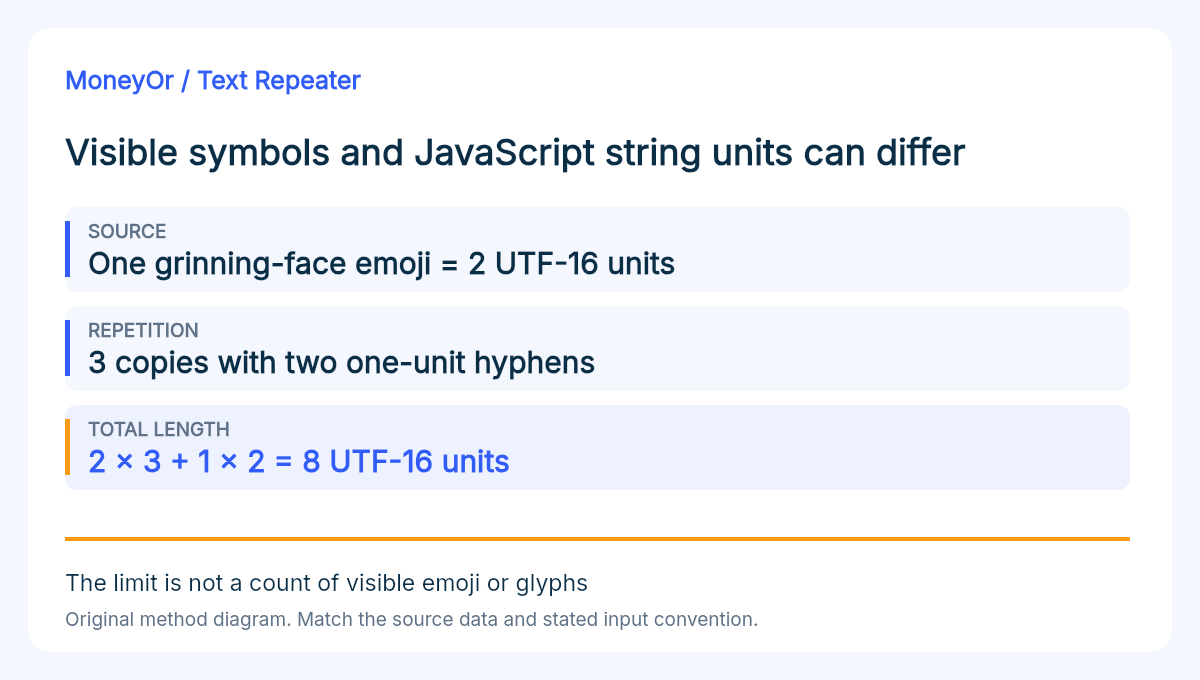
| One grinning-face emoji | 3 | - | Three intact emoji with two hyphens |
| Any ordinary source | 0 or 201 | Any | Count rejected |
| Any ordinary source | 2.5 | Any | Noninteger count rejected |
| 250,000 ASCII characters | 2 | Empty | 500,000 output units accepted |
| 250,000 ASCII characters | 2 | One hyphen | 500,001 output units rejected |
The upper output boundary includes separators. Two large source copies may fit with an empty separator but fail when even one character is inserted between them. Check the combined representation, not only the source length or repetition count in isolation.
For a long result, choose the smallest sample that answers your practical need. A permitted output can still be awkward to review, paste or display in another application. The Text Repeater's limit does not establish the destination's own accepted size.
Text Repeater UTF-16 output-length formula
Let L be the source length in JavaScript string units, N the repetition count and S the separator length in the same units. The combined length is L × N + S × (N - 1). There are N source copies but only N minus one gaps between them. The boundary checks use that complete length.

For the checked go example, L is 2, N is 3 and the separator has length 3. The source copies contribute 6 units and the two separators contribute 6, making 12 units in the output. The generated go | go | go matches that result.
A single copy has no inter-copy gap. With source A, count 1 and separator ?, the output is A. The separator contributes zero units because there are no adjacent copies to connect. This behavior avoids an extra trailing mark, but any mark already inside the source remains.
JavaScript length uses UTF-16 units. The checked grinning-face emoji occupies two units, so three copies with two one-unit hyphens produce eight units despite containing five visible symbols. This is why a visible-symbol count and an engine length limit can differ without either calculation being wrong.
The formula and worked values were checked in code. When estimating your own output, include any line endings and outer spaces in the source. A copied block may contain characters that are not obvious in a narrow input field, so inspect it before increasing the count.
The limit examples illustrate an important boundary case. Two copies of a 250,000-unit source reach exactly 500,000 units when the separator is empty. Adding one hyphen between them produces 500,001 units and is rejected. The count is still valid, but the chosen representation no longer fits the output allowance.
Do not remove a separator merely to squeeze an otherwise unsuitable sample into the limit. A separator may be essential to the intended test or display. Reduce the source length or count while preserving the representation that the destination actually needs. The correct sample is the one that answers the task, not the largest one permitted.
What happens when the source already has multiple lines?
The complete multiline source is repeated as a unit. In a checked example, source x followed by a newline and y is repeated twice with separator / . The result contains x, a newline, then y / x, another newline and y. The separator joins the end of one whole block to the beginning of the next.
This does not repeat each line independently. If you want several copies of each separate entry, process those entries according to that requirement in an appropriate editor or script. Repeating the entire list simply produces several copies of the list in the same order.
A trailing newline inside the source becomes part of every copy. Combined with a separator, it can produce a layout different from a source without that ending. Check the boundary between copies, where the source's own ending and the chosen separator meet.
The Text Joiner can convert an existing line list into a chosen representation. The Text Splitter can separate a literal-delimited source. Those operations reorganize existing content; they do not duplicate the whole block as the Text Repeater does.
What are useful ways to apply repeated text?
A small artificial block can help test how your own form handles repeated words or how a draft layout wraps a predictable pattern. Use invented sample material and define the expected behavior in your test notes. Repetition generates the sample; it does not decide whether the Text Repeater or layout passed its test.
Decorative separators and placeholder lines are another use. Inspect them at the intended display width because plain text can wrap differently across fonts and screens. A pattern that aligns in one editor may appear uneven in another. The Text Repeater does not control font metrics or application layout.
For practice material, a repeated phrase can provide a predictable source to copy or compare. It does not replace a learning exercise that requires writing or composing something independently. Use it as a formatting aid rather than representing generated repetition as completed personal work.
When sharing a repeated block with another person, consider its length and their expectations. The Text Repeater provides no sending function. You remain responsible for deciding whether the content is useful and welcome in the destination. Generating a block locally is different from automating delivery or repeatedly submitting it.
A repeater also does not produce realistic language variation. Every copy is identical. For testing that depends on diverse names, word lengths or punctuation, design an appropriate sample set instead of assuming repetition alone covers those cases.
How can I verify the result before copying it?
First verify a small count by reading each copy. Check whether there is exactly one chosen separator at each boundary and no unexpected trailing separator. Then inspect the source's own spaces and punctuation. An extra gap may come from the source rather than from a duplicated separator.
Use the Character Counter to inspect a result if its documented counting rule matches your purpose. Different tools can count visible symbols, code points or string units differently. For the Text Repeater's limit, JavaScript string units are the relevant measure.
Check the complete pasted block in the destination. A platform may truncate input, impose a smaller limit or reformat line endings. The Text Repeater does not know those requirements. Test with a modest sample and verify the saved result rather than assuming successful generation means successful transfer.
If the output is wrong, correct the source or separator and generate a fresh block. Editing hundreds of repeated boundaries manually is error-prone. Keep the short original source so a corrected result can be regenerated consistently without copying an already mistaken output.
When using repetition as a test fixture, keep the parameters alongside it: source, count and separator. That makes the sample reproducible. It also helps distinguish a generator error from a later paste or display change in the system being tested.
A source that already contains the separator can make visual counting ambiguous. The generated text does not mark which occurrence came from the source and which was inserted between copies. Verify a small count before scaling up, and keep the inputs so you can reproduce the expected block instead of inferring it from appearance.
For screenshots or demonstrations, label repeated material as sample content where that helps a reader understand it. Repetition can fill a layout predictably, but it should not resemble genuine user activity or testimonials. Use a clearly artificial phrase when the purpose is testing a page rather than presenting real records.
What processing limits and references apply?
The source itself is capped at 500,000 JavaScript string units, and the combined output must also fit within 500,000 units. A checked boundary accepts a 500,000-unit source when repeated once. A source one unit larger is rejected before generation. Count validation and output-size validation are separate checks.
MDN Web Docs' Array.prototype.join(), checked 26 November 2026, explains connecting array entries with a specified separator. The current engine builds repeated source copies and joins them. The checked examples establish its count and length limits.
The operation runs in the browser tool engine. Broader site services and analytics are separate from that generation step. Consult the MoneyOr privacy policy and use nonsensitive samples when exploring output size or unusual character behavior.
No automatic messaging, upload workflow, scheduled generation or changing-number mode is part of this task. The useful output is the plain-text block you have inspected and intentionally chosen to use. Keep the size appropriate to the destination and the purpose of the sample.
Repetition questions
Why is there no separator after the last copy?
The separator connects adjacent copies, so there are fewer separators than copies. If a final mark is required, add it deliberately in the destination or include the intended ending in the source after checking the resulting boundaries.
Can I repeat text a thousand times here?
The current count range ends at 200. A higher count is rejected rather than silently reduced. Use a suitable local workflow for a different requirement and still account for its output-size and destination limits.
Does it repeat each emoji as a separate item?
It repeats the entire entered string. A sequence of several emoji remains that same sequence inside each copy. It does not segment the source into independent visible symbols or alternate among them.
Will repeated text be sent to a messaging app?
No. Generation produces text for your review. It does not send, schedule or automate messages. Check the destination's current requirements and use the result only where it is appropriate.
Can I recover the original count from any repeated block?
Not reliably when the source and separator are unknown or overlap. Save the generation parameters if reproducibility matters. The tool generates from your inputs rather than analyzing an arbitrary block to infer its history. Keep the short source separately from generated samples.
Source and output check
MDN Web Docs, Array.prototype.join(), checked 26 November 2026, is linked above. Inspect a small example, include separator length in your size calculation and verify the complete result after transferring it to the intended destination.