Text sorter
Try Text Sorter
Loading calculator. If this message stays visible, enable JavaScript and reload.
Your result
The text sorter rearranges non-empty lines in ascending or descending order using the browser's locale-aware text comparison. Put one complete entry on each line, choose the direction and run the tool. Repeated entries remain repeated. Blank and whitespace-only rows are removed, while spaces around a non-empty entry stay in that entry.
This is useful when a plain-text list needs a readable order and its original sequence has no meaning. Sorting is a structural change: a chronological log, ranked shortlist or sequence of instructions can become misleading after reordering. Keep the source and decide which information each line must carry before using the result.
On this page
- Text Sorter complete-line comparison
- Text Sorter independent-entry preparation
- Text Sorter checked textual ordering
- Text Sorter locale and collation limits
- What happens to blank rows, spaces and duplicates?
- When should I use a spreadsheet or structured-data sort?
- How can I verify that the result is complete?
- What are the practical limits of this operation?
- Frequently asked questions
- Sources and method notes
Text Sorter guide and examples
Text Sorter complete-line comparison
The unit of sorting is a complete line. The Text Sorter separates CRLF, CR and LF line endings, drops rows whose trimmed content is empty, then compares the surviving original strings. It does not split a row into individual words or locate a surname, date, price or other field inside it.
Ascending order uses JavaScript locale-aware comparison. Descending order reverses the sorted array. No particular language, numeric collation option or case preference is selected in the Text Sorter. This matters for accented letters, mixed capitals and punctuation, where a universal ASCII ordering would be a different rule.
A list containing full names is sorted from the beginning of each complete name. If a name starts with a given name, the Text Sorter does not infer that the surname should control the sequence. Similarly, entries with leading labels are compared with those labels included.
The Alphabetical Sorter is the related main topic for alphabetizing lists. Here the emphasis is the line-processing contract: what gets removed, what gets preserved and how direction changes the output. Neither label should be read as a promise of a prescribed library catalogue or institutional filing standard.
Text Sorter independent-entry preparation
First check the boundaries between entries. A visual wrap in a narrow text box is not necessarily a newline. Conversely, text copied from a PDF may contain hard line breaks inside one intended entry. Sorting before fixing those boundaries can separate pieces that belong together.
- Save a copy of the original list.
- Arrange one complete independent entry per actual line.
- Check whether padding, bullets and prefixes should remain.
- Paste the list into Your text.
- Choose Ascending or Descending in Sort order.
- Run the operation and inspect the first, last and repeated entries.
- Check the destination after pasting the result.
For a small vocabulary list, preserving one word per row is straightforward. For a contact list, each row needs to contain all information that must move with that contact. Never sort only the names and then paste them back beside unsorted phone numbers.
When several lists are combined, make sure a newline separates the last entry of one list from the first entry of the next. A missing boundary creates a single combined string. The Text Sorter treats that string as one entry and cannot recognize that it came from two records.
Start with a short representative sample when the source uses accents, different scripts or mixed punctuation. The sample should include the entries whose relative order matters most, rather than only simple lowercase English words.
Text Sorter checked textual ordering
These examples were checked in code against the Text Sorter. Semicolons in the table separate described rows; they are not delimiters the tool understands. Enter actual newlines to reproduce each list.
| Input rows | Direction | Checked result | What it demonstrates |
|---|---|---|---|
| pear; apple; banana | Ascending | apple; banana; pear | Complete lines change position. |
| pear; apple; banana | Descending | pear; banana; apple | The sorted sequence is reversed. |
| b; empty; spaces only; a; b | Ascending | a; b; b | Blank rows disappear; duplicates remain. |
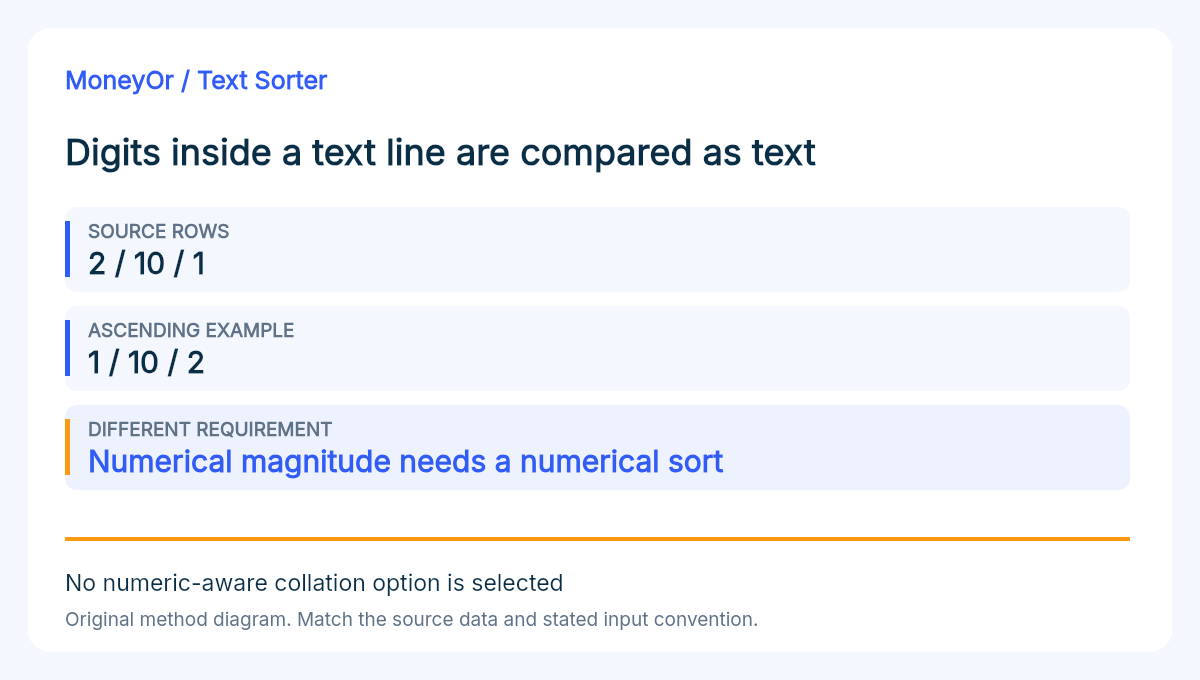
| 2; 10; 1 | Ascending | 1; 10; 2 | Text ordering is different from numerical magnitude. |
| leading-space a; b | Ascending | leading-space a; b | Non-empty row padding is retained. |
For the first example, the source and ascending result can be written explicitly:
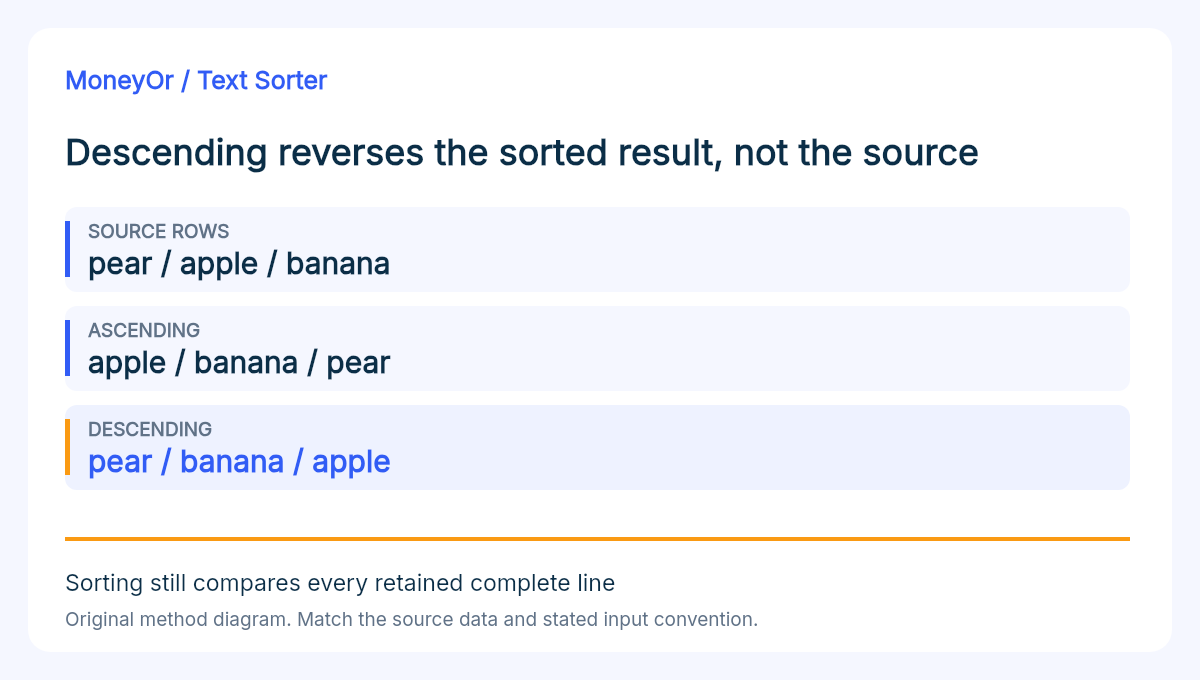
Input:
pear
apple
banana

Ascending result:
apple
banana
pear
The example with numbers is especially useful when checking a workflow. An apparently alphabetical result can look incorrect if the intended rule was numerical. For numerical values, choose the Number Sorter and review its supported number formats instead.
Simple examples establish the Text Sorter without defining every locale-specific tie or punctuation rule. If another computer places two accented entries differently, compare the collation settings and runtime before assuming one list has lost data.
Text Sorter locale and collation limits
Text comparison is not always a direct comparison of character numbers. A language-aware ordering can treat letters in ways appropriate to a language or region. The browser supplies the locale-sensitive comparison used here, and this page offers no control for choosing a specific locale.
For a casual reading list, that default may be suitable. For an official index, database export or reproducible build, the comparison rule is part of the specification. Document the required locale, case handling, accent handling and any secondary key in the system responsible for that output.
The Text Sorter does not lowercase entries before sorting and does not remove accents. It also does not normalize visually similar Unicode sequences into a common representation. Original non-empty row strings are retained even when the comparison regards some strings as closely related.
Do not infer an equality rule from adjacency. Two entries appearing next to one another after a sort are not necessarily duplicates. A name with a diacritic may refer to a different person, and a case difference can matter in an identifier even if the surrounding list is intended for human reading.
For technical background, MDN documents localeCompare and the comparison facilities of Intl.Collator. The practical implication for the Text Sorter is narrow: use a controlled comparison elsewhere when the exact order must be shared across systems.
What happens to blank rows, spaces and duplicates?
An empty line is removed. A line containing only whitespace is also removed because the Text Sorter checks whether its trimmed content is non-empty. This is a filtering decision; it is separate from the comparison used to position the remaining rows.

A line with meaningful characters and surrounding spaces is kept with those spaces. The Text Sorter does not trim that line merely because it used trimming to decide whether the line was blank. A retained tab or leading space can therefore affect comparison as well as the appearance of the output.
Use the Text Trimmer only when removing line padding is an intended preparation step. Check its precise trimming behaviour before applying it. In a fixed-width source, padding might have structural meaning and should not be removed casually.
Repeated lines are preserved. If a source has two identical entries, sorting can place them together but does not turn them into one. Use the Duplicate Line Remover for a separate cleanup task, with a clear rule about which differences should matter.
These operations should be ordered deliberately. Trimming before deduplication can merge entries that were previously distinct. Sorting before counting can obscure original sequence. Keep an untouched source whenever a later reviewer may need to understand which transformation changed the data.
When should I use a spreadsheet or structured-data sort?
Use a row-aware tool when an entry has multiple associated fields. A spreadsheet can move an entire record while sorting by a selected column. A database can specify several sort keys and a collation. This plain-text sorter only sees the complete strings supplied to it.
A header is another reason to prepare the input carefully. The tool has no keep-header option, so a heading pasted into the list is treated as another sortable line. Keep the header outside the input and add it back in the destination if it is still needed.
CSV data needs particular care. A quoted field may contain a newline, which means a physical line is not always a complete record. A plain line split cannot parse that structure. Use a CSV-aware workflow so fields and quoted boundaries survive intact.
Likewise, avoid sorting source code, legal clauses or numbered instructions solely to improve their appearance. Their sequence may carry meaning. A sorted output can retain every visible character and still change the meaning of the document by moving its parts.
For an ordinary list, a useful decision is whether each row can stand independently. If moving a row requires moving anything outside that row, either expand the row to include the associated information or use a tool that understands the full record.
How can I verify that the result is complete?
Check both membership and order. The first check asks whether the intended entries survived; the second asks whether their arrangement matches the chosen direction. A tidy-looking output is not evidence of completeness, especially when blank rows or accidental hard breaks were present.
Use the Line Counter to inspect row structure when needed, while remembering that its count may include rows this sorter filters out. Compare non-empty entries under the same definition rather than expecting every line-counting tool to report an identical number.
Inspect repeated labels, entries at both ends of the alphabet and any unusually indented row. Check a few entries from the middle as well. If the list has identifiers, match a sample of identifiers against the source instead of checking names alone.
After copying, verify actual newlines in the destination. An editor may visually wrap long rows, convert whitespace or paste into a single table cell. The transformation and the destination's rendering are separate stages; successful sorting does not guarantee the destination will preserve the same layout.
When a list needs an auditable history, retain the original, the selected direction and the final output together. The result by itself cannot recover the earlier order. This is especially relevant when list position previously represented priority, chronology or the order in which entries were collected.
A second check is useful when lists are exchanged between colleagues. Agree whether the expected result is the same set of entries or the exact same byte sequence. The latter includes line-ending conventions, trailing spaces and collation choices. This tool joins output rows using LF, so a source that used CRLF can have different boundary bytes even when every retained entry looks unchanged.
For a list of product labels, inspect any labels that begin with punctuation or a numerical code. Decide whether that prefix is the intended sort key. If a category prefix was added only for display, sorting by the full row may group by category before the product name. The tool cannot infer a hidden preferred key from the wording.
If the result will become navigation on a website, review it as a reader as well as as data. Long titles with repeated introductory words may be technically sorted yet difficult to scan. Shortening a label is an editorial decision that should preserve its meaning and destination; sorting alone does not make those decisions.
What are the practical limits of this operation?
The operation is a text reorder, not a validation or correction service. It does not check spelling, confirm that a person exists, standardize addresses or identify invalid reference codes. An incorrect entry remains incorrect after it moves into a more readable place.
The underlying text helper rejects input beyond 500,000 JavaScript string units. That limit is not a performance guarantee for every device. A smaller sample is easier to inspect, and very long lines can make a result awkward to review even when the total input is accepted.
Processing for this sorting operation takes place in the browser. Website delivery and other site activity are separate from that computation. Use non-sensitive sample data for general experimentation and read the MoneyOr privacy policy for the site's broader practices.
Choose the tool when the intended rule is a browser-default text comparison over independent non-empty lines. Choose a structured sorter when the rule needs a specific locale, a field key, numeric interpretation or preservation of record relationships.
Frequently asked questions
Can I sort the words within a paragraph?
Not directly. A paragraph on one line is one entry. Splitting its words into rows would be a separate transformation and would discard the sentence's original word order. Use that only for a word-list task where the sentence itself is no longer needed.
Does descending order mean reversing my original list?
No. It reverses the ascending sorted result. If you need the exact opposite of an existing sequence without comparing its entries, use a sequence-reversal workflow. Descending sorting can substantially change a source that was not already sorted.
Will a comma separate two entries?
No. The boundary is a line ending. A comma inside a row stays part of that row. Convert a simple delimiter-separated list to separate rows only after checking whether commas can also occur within an intended entry.
Can I keep a blank separator between groups?
The sorter removes blank and whitespace-only lines. It also sorts all retained rows together, so separate groups are not preserved. Sort each group separately and restore deliberate separators afterwards, or use a workflow with explicit group handling.
Is this a natural sort for filenames such as item2 and item10?
No numeric-aware option is selected. A filename's digits are part of its text. If embedded number order matters, use a natural-sort implementation with a documented numeric rule, then verify mixed prefixes, extensions and any leading zeroes.
Sources and method notes
References checked 26 November 2026: String.localeCompare. These references explain the underlying method. The Text Sorter uses the implementation and limitations described above; a reference does not certify an entered record or its destination.